
Open Live during a stream
Choose Run → Live in your channel's sidebar. Live keeps the sidebar available so you can move to Flows, Overlays or other pages while you stream. The activity feed updates as flows run and catches up after a connection interruption.
The status area shows whether your stream is Online or Offline, the current giveaway, the number of songs waiting and the Nuke tool. Open a status item to work with it. If a giveaway is open, you can Draw from Live; its winners and claim time appear there too.
For example, start a giveaway with a flow, then open Live. The giveaway item shows its title and entry count. When you draw, any winners and their remaining claim time appear in the same place.
Manage the alert queue
The Alerts queue panel shows what is playing, what is up next and whether the queue is paused or waiting for an overlay in OBS. Use Skip to move past the current item, Pause or Resume to control playback, Replay to play the last item again, and Clear to remove waiting items. The buttons become available when there is something they can act on.
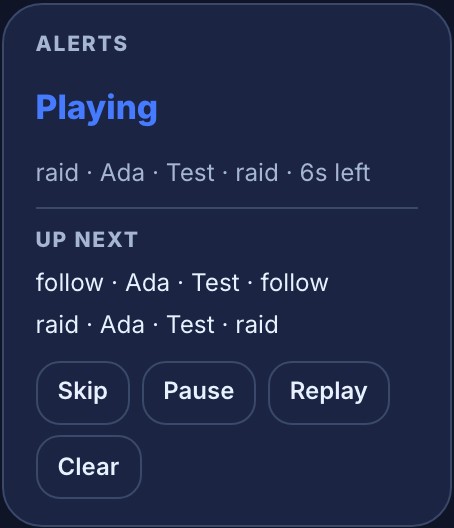
An alert test sent with Test on stream… enters this same queue and can reach viewers. A flow editor's Test fire is simulated and does not play an alert on stream. Test alerts and check OBS delivery explains when to use each test.
Read recent activity
Activity lists flow runs across your channel. Recent shows the latest runs; This stream filters those runs to the current broadcast. The feed loads up to 100 recent runs when opened and adds new runs as they happen. If you are offline, This stream is empty and Recent still shows earlier activity. Each row names the flow, how the run ended, what triggered it and when it happened. Open a flow's name to inspect or change it. Choose Problems only to find runs that need attention, then Everything to return to the full feed.
A flow set to Any chat message gets one running tally in Recent. Its checked and acted counts begin when you open Live, so a busy chat does not fill the feed with quiet checks. A run that acts or has a problem still appears as its own row.
Was this guide helpful?
Thanks. Your answer helps us decide which guides to improve.