
Two directions
A flow can talk to the rest of the internet both ways:
- In: the On a web request trigger gives a flow its own private URL. Pressing a Stream Deck key, tapping a phone shortcut or running a script calls that URL, and the flow runs — for example, a key that posts your Discord link in chat.
- Out: the Web request action calls a web address of yours from inside a flow — to ping a service when you go live, or fetch a line of text to post.
Both are listed under Automation in Flows → Your plan, as Webhook triggers and Outbound requests. They are not available on every channel yet; when your channel does not include one, its node shows a lock in the library. What your plan includes explains the panel.
1. Get a flow’s URL
The quickest start is the Stream Deck button flow in the Starter pack: it already has the trigger, and it posts whatever message the caller sends. To build your own instead, add On a web request from the node library’s Integrations topic as the flow’s trigger.
- Open the flow and press Save once. A new flow has no URL until its first save; until then the trigger says Save this flow once and its URL appears here.
- The trigger’s Your URL field now shows the address. Choose Copy.
- Turn the flow on. A paused flow does not answer its URL — pack flows arrive paused.
- Paste the URL into the tool that will call it — a Stream Deck action that calls a web address, a phone shortcut or your own script.
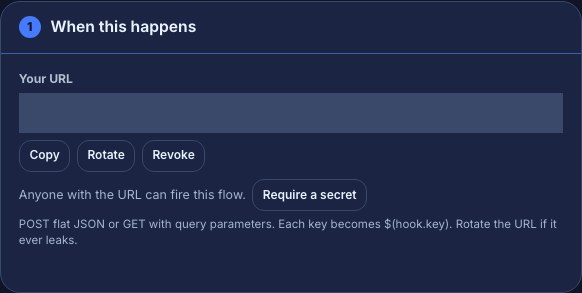
Anyone who has the URL can run the flow, so keep it private. Rotate makes a new URL and the old one stops working at once. Revoke removes the URL entirely until you save the flow again or choose Create one. Taking the trigger out of the flow removes its URL too.
2. Send it some details
A call can carry details for the flow to use. Each one becomes a token named $(hook. plus its key — a key called message is $(hook.message).
- POST a flat JSON object, such as
{"message": "Discord is open!"}. - Or GET the URL with query parameters, such as adding
?message=helloto the end.
For example, from a terminal, with your copied URL in place of the placeholder:
curl -X POST "PASTE-YOUR-FLOW-URL-HERE" -H "Content-Type: application/json" -d '{"message": "Discord is open! discord.gg/example"}'The Stream Deck button flow sends $(hook.message) to chat, so this posts Discord is open! discord.gg/example. Keep details simple:
- Up to 20 keys of up to 64 characters, named with letters, digits and underscores. Keys are read in lower case, so
Messagearrives as$(hook.message). - Each value is text, a number or true/false, up to 200 characters. Nested objects and lists are refused.
- The whole body is at most 4 KB.
- A key the caller did not send comes out empty.
3. Require a secret (optional)
By default the trigger says Anyone with the URL can fire this flow. For a script you control, choose Require a secret. The secret is shown once, so copy it straight away; the trigger then reads Signed requests required.
Each call must then carry an HMAC-SHA256 signature of the exact request body — for a GET, of the query string after the ? — made with the secret, sent as a hex string in the X-AWRA-Signature header. A sha256= prefix is accepted. Calls without a valid signature are refused. New secret replaces it, and Remove secret goes back to URL-only.
A Stream Deck key or phone shortcut usually cannot sign requests. For those, keep the URL private and rotate it if it leaks.
Check it works
- Test fire checks the flow’s steps without calling the URL. A test has no caller, so the trigger reports no payload in the Run log and every
$(hook.…)token comes out empty — the Stream Deck button flow would send an empty message. Nothing is posted. - Call the real URL — press your Stream Deck key, or run the command above. This runs the flow for real: its chat message is posted in your chat.
- A successful call answers
202with{"ok": true}straight away, before the flow finishes. Open the flow’s Run log to see what it did.
Call a service from a flow
- On the Flows page, the header button reads Web requests: off until you allow them. Choose it so it reads Web requests: allowed. This is one switch for your whole channel.
- In a flow, add the Web request action from the Integrations topic.
- Fill in URL (
https://only;$(...)tokens are filled in), Method — GET (fetch) or POST (send a body) — and, for a POST, Body (POST). A body that is valid JSON is sent as JSON; anything else is sent as plain text. - To use the answer, set Keep the answer as to a short name such as
weather. Later steps read the reply as$(local.weather)and its status code as$(local.weather_status), or through Insert… under this step’s name. - Wire the step’s ok output to what should happen next, and its bad answer output to a fallback, such as a chat line saying the service is down.
For example, a !weather command that fetches a plain-text forecast:
| Field | Value |
|---|---|
| URL | https://weather.example/today?format=text |
| Method | GET (fetch) |
| Keep the answer as | weather |
| Next chat message | Today: $(local.weather) |
Test fire never makes the request: the Run log shows the address it would call, and the answer reads (dry run). Only a real run reaches the service.
Troubleshooting
- The URL answers
404: the flow is paused, the URL was rotated or revoked, or the flow was deleted. Turn the flow on, or copy its current URL again. A flow restored from the Trash comes back paused, with a new URL. 429: too many calls. One URL takes up to 10 calls a minute, and your channel up to 30 across all its URLs. Wait a minute.401: the flow requires a secret and the signature is missing or wrong. Sign the exact body you send.400or413: the details are not flat JSON, break one of the limits above, or the body is over 4 KB. The answer says which.- The flow ran but the message is blank: the caller did not send the key the message uses. Match the key names exactly, such as
message. - The Web request step always leaves by bad answer: check Web requests: allowed on the Flows page, that the address starts with
https://, and the Run log’s reason, such as no answer within 2 seconds or a redirect. - The node shows a lock: your channel does not include that capability yet. Nothing else about the flow changes.
Was this guide helpful?
Thanks. Your answer helps us decide which guides to improve.