
Before you start
Power-ups are what viewers buy with Bits instead of cheering: Twitch's own Message effect, Celebration and Gigantify an emote, plus the custom Power-ups you make on Twitch. Start a flow on Power-up used to answer them with a chat message, a sound, an alert or anything else a flow can do. Responding to Power-ups is included on every plan, Free too.
Power-ups need Bits on your channel. Eligible channels can unlock Bits through Twitch’s monetization onboarding before becoming Affiliate. Check which Twitch features your channel can use explains onboarding, permissions and live checks. Keep your channel connected on Connections so Bloopbot can read your custom Power-ups.
1. Start a flow on Power-up used
- Open Flows and choose + New flow, then Start blank.
- In Add a node, search for
power-upand add Power-up used. This is the trigger: it decides which flows start when a viewer uses a Power-up. - Give the flow a name you will recognise later, such as “Power-up thanks”.
2. Pick the Power-up
Select the trigger and open its Power-up field. It lists:
- Any Power-up, to run for every Power-up;
- Built into Twitch: Message effect, Celebration and Gigantify an emote;
- Your custom Power-ups: the ones your channel has made on Twitch, read from Twitch when you open the editor, with what each costs in Bits.
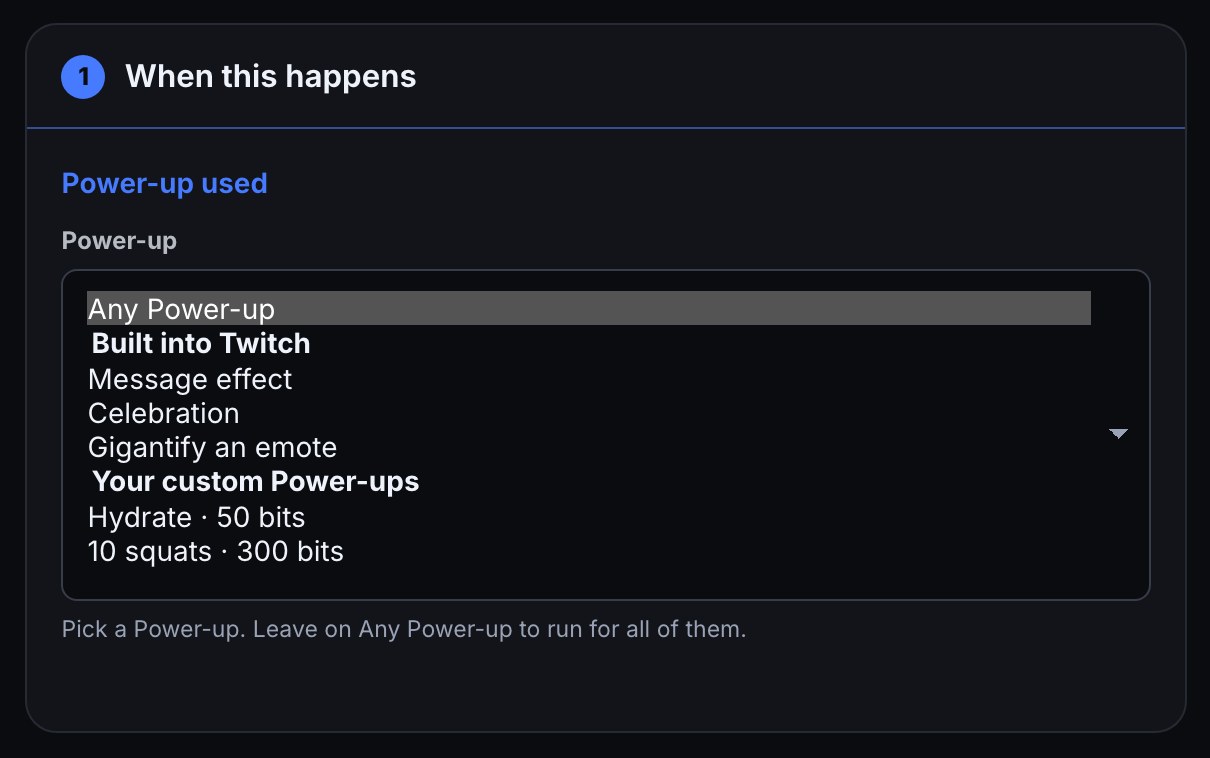
A custom Power-up is matched by its name, whatever its capitals. If you rename it on Twitch, the field shows the old name marked (not on Twitch now); pick the new name to repair the flow. If the field cannot read your custom Power-ups it says why, and you can type the name exactly as it appears on Twitch.
3. Say something back
Add a Send a chat message action and connect it to the trigger’s next output. The Insert… menu on that action offers what the Power-up carried:
| Token | What it says |
|---|---|
$(user) | Who used it |
$(powerup) | The Power-up’s name, such as Gigantify an emote or your custom Power-up’s name |
$(bits) | How many Bits it cost |
$(query) | The text the viewer typed, for a custom Power-up that asks for it |
$(emote) | The emote it used: the one gigantified, or the one a custom Power-up unlocked |
$(kind) | power_up for one built into Twitch, custom_power_up for one you made |
For example:
$(user) spent $(bits) Bits on $(powerup)! Thank you!To play a sound or show something on stream instead, add a Play media or Show alert step after the trigger, as in Play a sound or show an alert.
Check it works
- Press Save, then Test fire. Choose the sample: Power-up: Bitsybot gigantifies an emote or Custom Power-up: Bitsybot redeems Hydrate. A test fire is a dry run, so nothing reaches chat or Twitch.
- The samples are a gigantified emote and a custom Power-up called Hydrate. A flow set to a different Power-up stops at its trigger with a different Power-up (…); leave Power-up on Any Power-up while you test, then pick yours again before you switch the flow on.
- Use the Power-up yourself on Twitch to confirm the live path. The flow’s row on Flows shows when it last ran.
Troubleshooting
- A cheer flow stopped answering Power-ups: that is expected. Bits cheered runs only for cheers; start a flow on Power-up used for Power-ups.
- Nothing happened when a Power-up was used: the flow is paused, the Power-up was renamed on Twitch since you picked it, or the field names a different Power-up. Check Needs attention on Flows for what stopped.
- Your custom Power-ups are not listed: read the reason under the field. For missing permission, choose Re-authorize on Connections, then reload. A channel with no custom Power-ups yet is told to make one on Twitch.
$(query)or$(emote)comes out empty: only a custom Power-up that asks for text carries$(query), and only Power-ups that use an emote carry$(emote).
Was this guide helpful?
Thanks. Your answer helps us decide which guides to improve.