
Start with the bot’s access
On Connections, check the bot account your channel uses. The bot-account section only appears on the Connections page when your plan includes your own bot account — check Your plan; without it the shared bot account speaks in your chat and there is nothing to re-authorise there. When the section appears, make that account a moderator: copy the /mod command from the Not a mod bar across your dashboard and send it in your Twitch chat. Re-authorise a connection if the dashboard reports missing permissions. Until Twitch lists your bot as a moderator, the filters leave chat alone: they don’t delete, warn or time anyone out, and no strikes build up.
Configure the filters
If your channel uses guided setup, filters start off until you choose to enable them. Switching an existing channel to guided setup keeps its effective rules, including defaults it was already using. For channels using the original setup, every filter starts on: blacklist, links, caps, symbols, emotes and repetition. A first offence gets a warning and its message is deleted; after that, timeouts grow from 5 seconds to 1 minute, 10 minutes and 1 hour, and a viewer's strikes fade after an hour. Subscribers skip every filter except the blacklist, and moderators skip them all. A link in a command one of your flows answers, such as !sr with a Spotify link for song requests or a video for media share, gets past the link filter, because the command's own checks decide what it takes; the other filters still apply to it. The blacklist, shown as Blocked words at the top of the page, starts empty, so it acts only once you add words to it: type a word and press Block, or separate several with commas. More options makes an entry a regex pattern, matches capitals exactly or gives it its own timeout, and the bin icon unblocks a word, with Undo if you change your mind. If you saved your Moderation settings before, they stay exactly as you saved them.
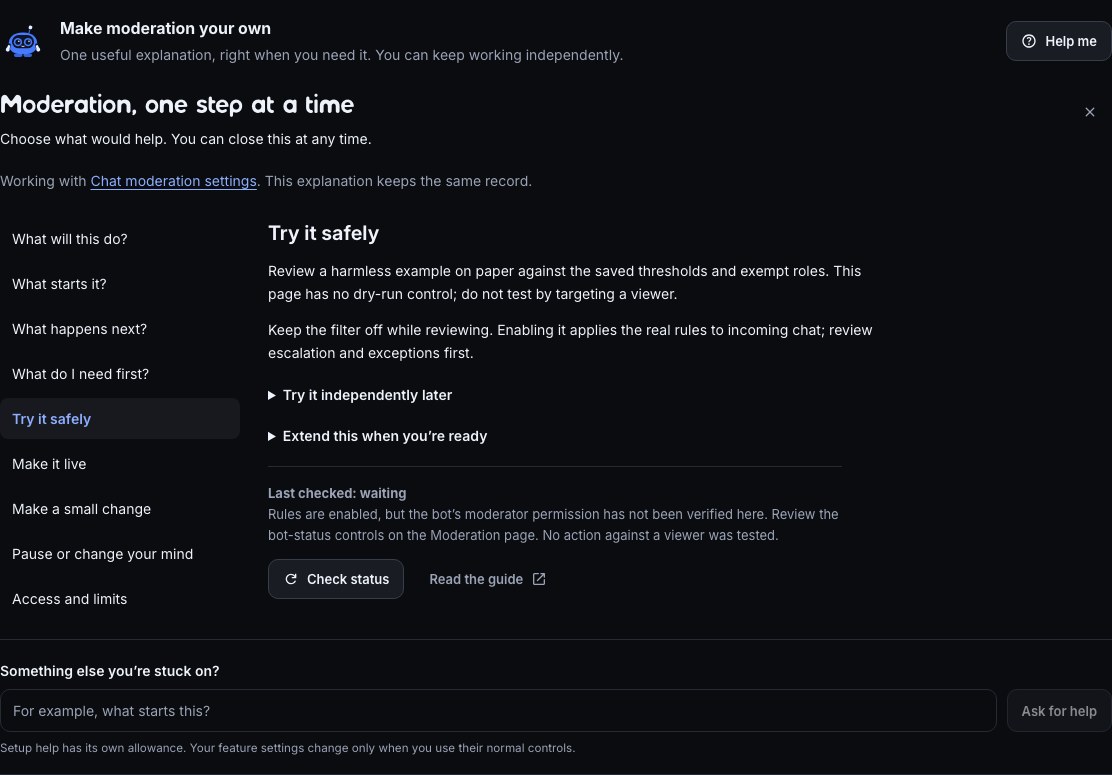
In guided setup, choose Moderation to review the saved rules and bot permission, with optional help on the same page. There is no moderation dry-run button: review harmless examples against your thresholds and exemptions while the filter is off. Never use an unsuspecting viewer as a test. Enabled rules are separate from proof that a rule acted live.
Open Moderation and review each filter and its configured response. Set thresholds, exemptions and escalation deliberately for your community, and switch off any filter your chat doesn't need. Save your settings and observe the result before changing several rules at once.
You and your editors change these settings here. Your Twitch moderators can switch filters on and off, manage the blacklist and the link whitelist, and !permit a viewer to post a link, all from chat: What moderators can do from chat lists the commands. A moderator you have ticked on Team can also change the filters, blacklist and whitelist on this page, though not the escalation settings: Share the work with mods and editors lists what they can do.
Messages split across chat lines
The enabled Blocked words and link filters also check recent messages from the same viewer together. Splitting a blocked phrase into two messages, or posting a domain and its ending separately, can still be caught when the new message completes it. A matching earlier line alone does not make later ordinary chat an offence.
The window includes up to five earlier messages from the last 60 seconds, with a cap on the retained text. Twitch and Kick viewers have separate windows. With copypasta blocking enabled in the repetition filter, three matching messages of at least 12 characters in that window also count as repetition. Different messages sent quickly are not a violation on speed alone. Existing exemptions, link permits and escalation still apply.
For meaning across a sequence, such as a greeting followed by a sales pitch, use AI moderation alongside the filters.
Moderate Kick chat
The filters screen Kick chat too, on a Kick channel and on a Twitch channel that has Kick added. They work from the same Moderation page, with the same thresholds, exemptions and escalation, and a filter's settings apply to both chats.
Bloopbot moderates Kick as you, with the permission you gave it when you signed in with Kick or added Kick. If your Kick connection is older, the Kick card on Connections says Update available and "Reconnect Kick to allow moderation." Choose Reconnect Kick and allow Bloopbot again. Until you do, the filters still catch a Kick message, but nothing is deleted or timed out.
- Exemptions. Kick's moderator, VIP, subscriber, OG and founder badges count like their Twitch equivalents, so "Moderators skip every filter" and "Subscribers skip the filters" work on Kick too. You are exempt as the broadcaster.
- Warnings. Kick has no warning message of its own. A warning on Kick deletes the message and posts the warning in Kick chat, the same as on Twitch. Silent mode posts nothing.
- Timeouts. Kick times a viewer out in whole minutes, from 1 minute to 7 days, so a timeout of 5 or 90 seconds becomes 1 or 2 minutes. Bloopbot deletes the message first, then times the viewer out.
- No bot to make a moderator. Replies come from your own Kick account, so the Not a mod bar and the pause until your bot is a moderator are Twitch's only. A flow that starts from Kick chat is never paused for it.
- Commands. Your Kick moderators and you can type
!filters,!permit,!blacklistand!whitelistin Kick chat. Bloopbot answers in Kick chat. - Flow steps. Time out and Delete message work on Kick: they act on the viewer or the message that started the flow, on the platform it came from. A Kick timeout is whole minutes, and a flow that starts from Kick chat needs the same Kick permission. The Ban, timeout or unban trigger starts for Kick bans and timeouts too (pick Platform to choose); Kick sends no unban, so Unbanned only fires for Twitch.
Two things stay on Twitch for now: Nukes, and the Moderation acted trigger, so a filter acting on a Kick message doesn't start those flows. Use Ban, timeout or unban to follow Kick bans and timeouts, including those a filter gives.
Add a helper flow
The Mod commands pack holds the commands your moderators run: !nuke, !title and !game for the stream information, and the alert queue controls !skip, !pause, !resume and !replay — skip the alert on screen, pause the queue (chat hears Alerts paused.), resume it (Alerts resumed.) and replay the last one. Open each installed flow to review its trigger, role checks and action.
To do something extra when a filter acts — tell your moderators in chat when a viewer reaches their third strike, for example — start a flow from the Moderation acted trigger. Which filter (such as Links or Blocked words), What it did (Warned the viewer, Deleted the message or Timed the viewer out) and At least this many strikes narrow it down. For bans, timeouts and unbans whoever issued them, including in the Twitch dashboard, use Ban, timeout or unban instead. A timeout a filter gives reaches both triggers, so let only one of your flows speak about it.
Until a !nuke flow is on, the Nukes page shows a !nuke command row at the top: There’s no !nuke command yet, so nothing can nuke chat. Press Add, read the review on the right and press Add 1 flow — paused, then Switch on on the row. If your !nuke flow is paused, the row names it, with Open flow and Switch on. Once it is on, the page names the flow !nuke runs from, with Open flow: who can nuke is that flow’s Who can trigger check, and switching the flow off is how you turn !nuke off. The page’s Limits cap every nuke, whatever a moderator types: how far back it looks, how long radiation lasts, and the longest timeout.
Stop a follow-bot raid
A follow-bot raid is dozens of brand-new accounts following your channel within a minute, often before a wave of abuse in chat. The Follow-bot protection pack notices the burst, turns on Twitch Shield mode, posts a calm announcement, and turns Shield mode off again 10 minutes later. It works on every plan.
Before you start, set up Shield mode on Twitch itself: in your Twitch moderator view, open Shield Mode settings and choose what it does — followers-only chat, a minimum account age, verification and the rest. Bloopbot only switches it on and off; your saved Twitch settings decide what it restricts. Bloopbot also needs your channel's permission to manage Shield mode: if a run says it needs your channel's authorisation, re-authorise it on Connections.
- Open Flows, press Marketplace, and choose Follow-bot protection.
- Press Add 1 flow — paused. The Follow-bot lockdown flow arrives paused.
- Open the flow and read it from left to right, using the list below.
- Switch the flow on.
What each step does:
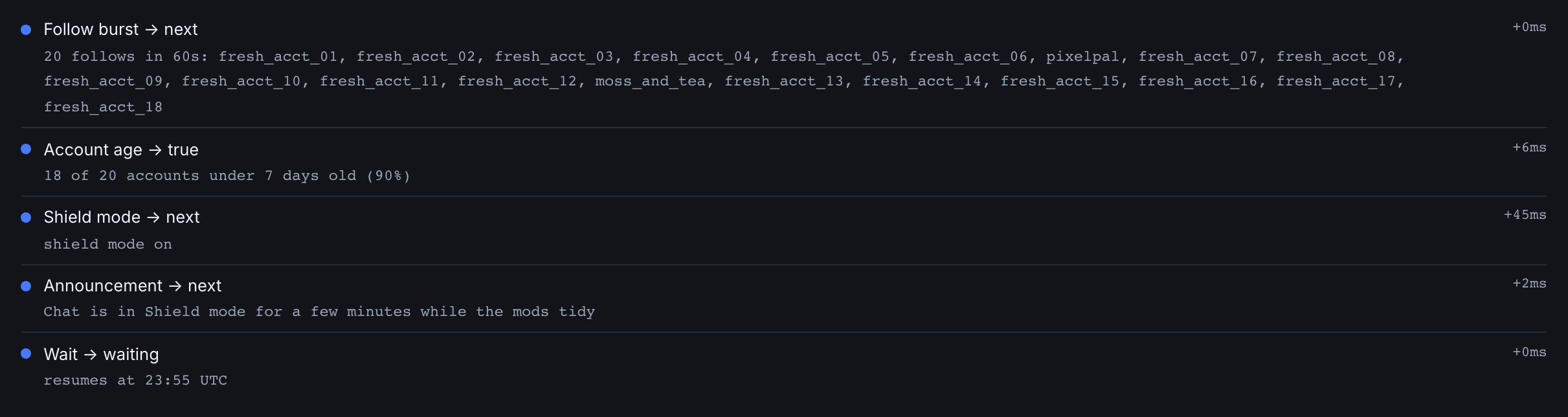
- Follow burst starts the flow when at least 20 different accounts follow within 60 seconds. One follow, or a normal trickle, never starts it.
- Account age, set to The follow burst, carries on only when at least 60% of those accounts are younger than 7 days. A real rush of new followers — after a shoutout from a big streamer, say — is mostly older accounts, so the flow stops there quietly. An account in the burst that Twitch has already suspended or deleted counts as new.
- Shield mode turns it on, and Announcement tells chat what is happening. Everyone in chat sees an announcement, the raiders included, so keep its wording calm and neutral.
- Wait holds for 10 minutes, then the second Shield mode turns it off.
For example, when 25 accounts follow within 40 seconds and 22 of them were created this week, the flow turns Shield mode on, announces it, and turns it off again 10 minutes later. While that burst's cooldown runs, the next follows don't start it again.
See who followed. Open the flow and expand its Run log. The Follow burst line lists the login of every account in the burst (up to 100), and the Account age line says how many of them were new, such as “22 of 25 accounts under 7 days old (88%)”, adding “3 no longer on Twitch” when some accounts are already gone. Bloopbot doesn't ban anyone in bulk: review the list with your moderators and act on Twitch where you need to. The Run log shows a burst as it happens while the flow is open in the editor.
To tune it, select a node and change its settings:
- Follows and Within (seconds) on Follow burst set what counts as a burst. A bigger channel that often gains 20 followers a minute should raise Follows. Then wait (minutes) is how long after a burst before another one can start the flow, 15 by default. That wait starts whenever Follow burst fires, even when Account age then decides the followers are real and stops the flow — so a follow-bot raid that arrives within 15 minutes of a genuine rush of new followers is missed. If you often get real follow rushes, after a raid or a shoutout, lower Then wait (minutes).
- Younger than (days) and At least (% of the burst) on Account age set how many new accounts it takes. Lower the percentage to act on a mixed burst.
- Wait for on Wait sets how long Shield mode stays on, up to an hour.
- The announcement's text and colour are yours to change.
Account age works in your own flows too. Set it to The viewer to check the follower on New follower, the chatter on Any chat message or Chat command, or the raiding channel on Incoming raid — for example, to skip the welcome message for an account made today.
If Shield mode stays on: saving a change to the flow's canvas while its wait is pending cancels the wait, so the step that turns it off never runs. Turn Shield mode off yourself in Twitch. If Twitch can't be reached to check the accounts, the run stops at Account age with “Couldn't look up account ages on Twitch” in the Run log, and Shield mode stays as it was. Test fire doesn't wait and asks Twitch nothing: it treats every account in its sample burst as new, so you can see the whole path at once.
Deleted messages on your overlay
A successful Bloopbot deletion on Twitch or Kick removes that message from the chat overlay too. A timeout or ban removes that viewer's displayed lines; refreshing or reconnecting the overlay does not bring them back. A failed deletion is not treated as confirmed removal.
Twitch supplies message-deletion events for actions taken by you or other moderators. Kick supplies ban and timeout events, so those clear the viewer's lines too. Kick does not currently supply Bloopbot with an individual-message deletion event: if you delete one message directly in Kick, the overlay may not hear about it. Deletions made by Bloopbot's filters or flows reach the overlay directly.
Check what happened
Use a flow’s Run log to inspect its path and failures. Use Audit log to see who changed channel configuration. Bulk moderation jobs are on Nukes; review the job details before considering a rollback. Test fire simulates actions without timing out or banning real viewers.
Was this guide helpful?
Thanks. Your answer helps us decide which guides to improve.