
Viewer questions that never scroll away
When chat is busy, a good question disappears in seconds. Bloopbot keeps the real ones on your Questions page until you answer them, puts the one you are answering on your overlay, and can reply from your own FAQ when a viewer asks something you have already covered.
Catching questions needs the AI chat trigger on your channel. Check What your plan includes first.
Keep the questions that matter
Viewers ask good questions in chat, and most of them scroll away before you see them. Catch viewer questions watches chat for genuine questions to you, such as "what game is this?" or "how long have you been streaming?", and saves each one to your Questions page. Chatter like "lol why", or a reply to someone else, is left alone, and nothing is posted back to chat.
It uses the AI: chat means… trigger, so it needs that feature on your channel. What your plan includes shows whether it is there.
Answer from one page
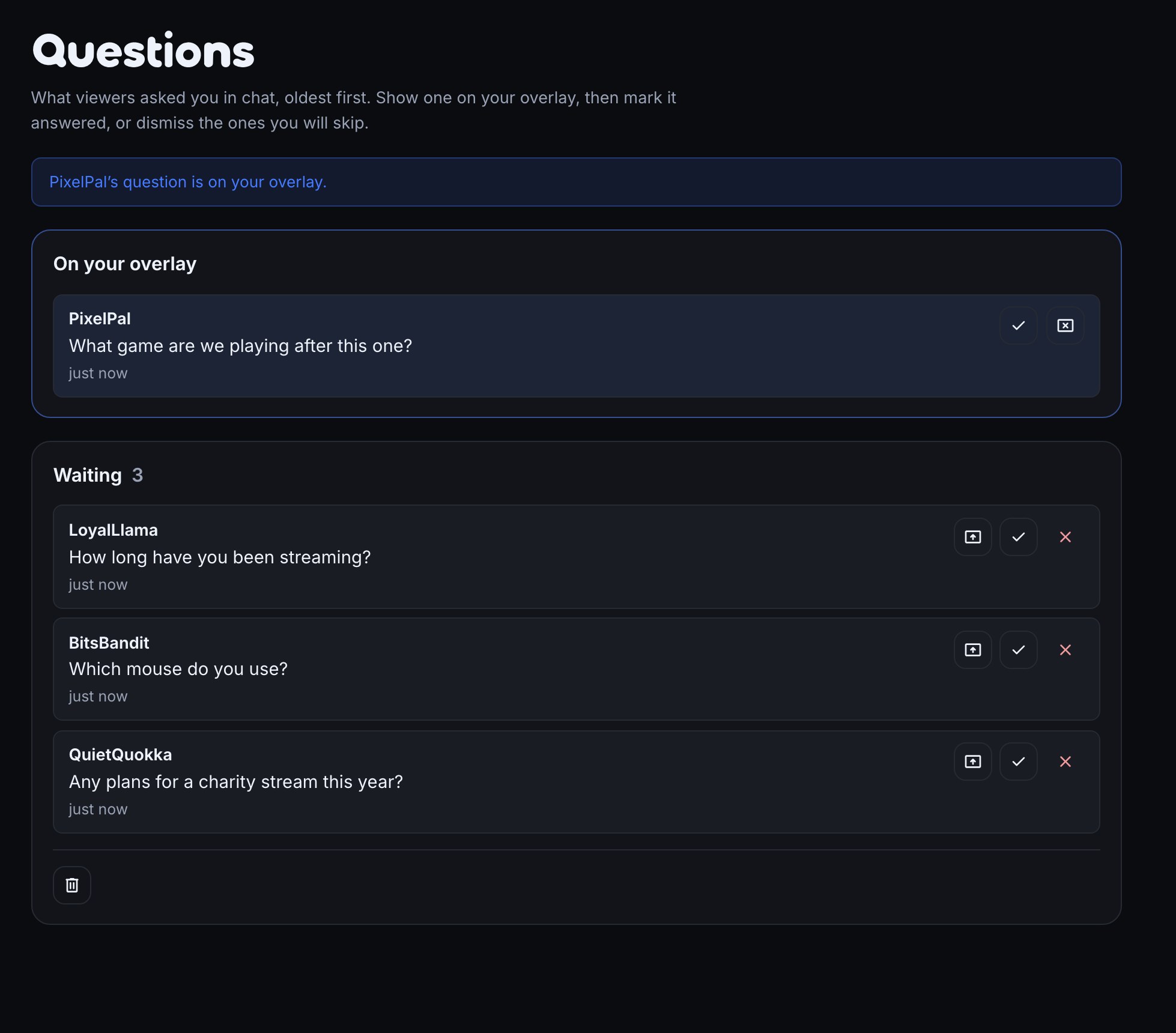
The Questions page lists every waiting question in order. Press Answered to take one off the list, or Dismiss for a question you will skip. Your moderators can run the page too, so they can pick the next question while you keep talking.
Show the question on your overlay
Put one question on your overlay while you answer it, so viewers can see what you are talking about. Mark it answered when you are done and it leaves the overlay, with the next one still waiting on the page. The guide covers the full set of steps and the overlay setup in OBS: Catch viewer questions.
Let a FAQ answer the repeat questions
Many questions come back every stream: when do you stream, what is your Discord? AI: answer from your FAQ lets chat get those answers without a command. The AI chooses which of your own FAQ entries answers the question and checks that the entry really covers it. The reply is the text you wrote, and when no entry is a clear match, nothing is posted. It needs Judge and route nodes on your channel. AI conditions and routing explains the setup.
Build your own question command
Prefer a command viewers type on purpose? A !q command can save a question to the same page. Flows are the way to build it, and the guide walks through a worked Q&A stream.
Start taking questions tonight.
Switch on Catch viewer questions in Flows, open the Questions page during your next stream, and show the first one on your overlay.