
Moderators and editors
Three kinds of people can help with a channel, and each gets a different amount of Bloopbot:
| Who | What they can do | How they get it |
|---|---|---|
| You, the owner | Everything | You linked the channel |
| Editor | Change your channel’s pages: flows, overlays, settings, moderation and the rest | You invite them or add them on Team |
| Moderator | Run the stream from a small dashboard: Live, Song requests, Queue, Questions, Media share, Nukes, Wheels, Moderation, Quotes, Highlights, your giveaways and one viewer’s points, plus your control panels if you allow it | They are a Twitch moderator of your channel, and you tick them on Team |
A moderator’s dashboard is a separate thing from a Twitch moderator’s power in your chat. Every Twitch moderator already has the chat commands below with nothing to sign in to; ticking someone on Team adds the dashboard on top. Editors and moderators sign in with their own Twitch accounts, so you never share yours.
What each can do
Moderators run the stream. They do not build the channel, see what you keep private or touch your account.
| You | Editor | Moderator | |
|---|---|---|---|
| Live, Queue, Nukes | Yes | Yes | Yes |
| Questions: show, answer, dismiss and clear viewers’ questions | Yes | Yes | Yes |
| Song requests: skip, remove, block and clear (not the Spotify connection) | Yes | Yes | Yes |
| Media share: approve, skip and remove viewers’ video requests | Yes | Yes | Yes |
| Spin a wheel | Yes | Yes | Yes |
| Moderation: filters, blacklist, whitelist and link permits | Yes | Yes | Yes |
| Quotes: add, fix and remove | Yes | Yes | Yes |
| Giveaways: open, close, draw, reroll and end one you already made | Yes | Yes | Yes |
| Loyalty: adjust one viewer’s points | Yes | Yes | Yes |
| Highlights: open the page and read it | Yes | Yes | Yes |
| Control panels: open them, press their buttons and change their values | Yes | Yes | Only with Use control panels |
| Control panels: make, edit or delete a panel | Yes | Yes | No |
| Giveaways: make, edit or delete one; stock or see prize codes | Yes | Yes | No |
| Build or edit flows, overlays, Variables, Schedule, Store, Public page and Marketplace | Yes | Yes | No |
| Change settings: Loyalty and Store settings, queue settings, nuke limits, moderation escalation, Connections | Yes | Yes | No |
| Audit log | Yes | Yes | No |
| Team, buying a plan, unlinking Twitch or Spotify, the bot account | Yes | No | No |
| Connect an AI assistant, the Stream Deck plugin, or another app | Yes | Yes | No |
A moderator never sees a prize code, even on a giveaway they are running: the pages they use show the prizes’ labels and how many are left, and nothing that could reveal a key, link or address. A page a moderator cannot use is not in their sidebar, and opening its address anyway shows a short Ask the streamer message instead of the page.
Someone who is both an editor and a ticked moderator is an editor. Take the editor role away and they stay a moderator.
Open the Team page
Team holds everything about who helps: your editors, your moderators and the link you send them. Only you see it.
- Sign in as the channel owner and choose your channel.
- In the sidebar open Settings › Team. Pebble’s Invite a helper tutorial walks you there too: Learn Bloopbot with Pebble’s tutorials lists it.
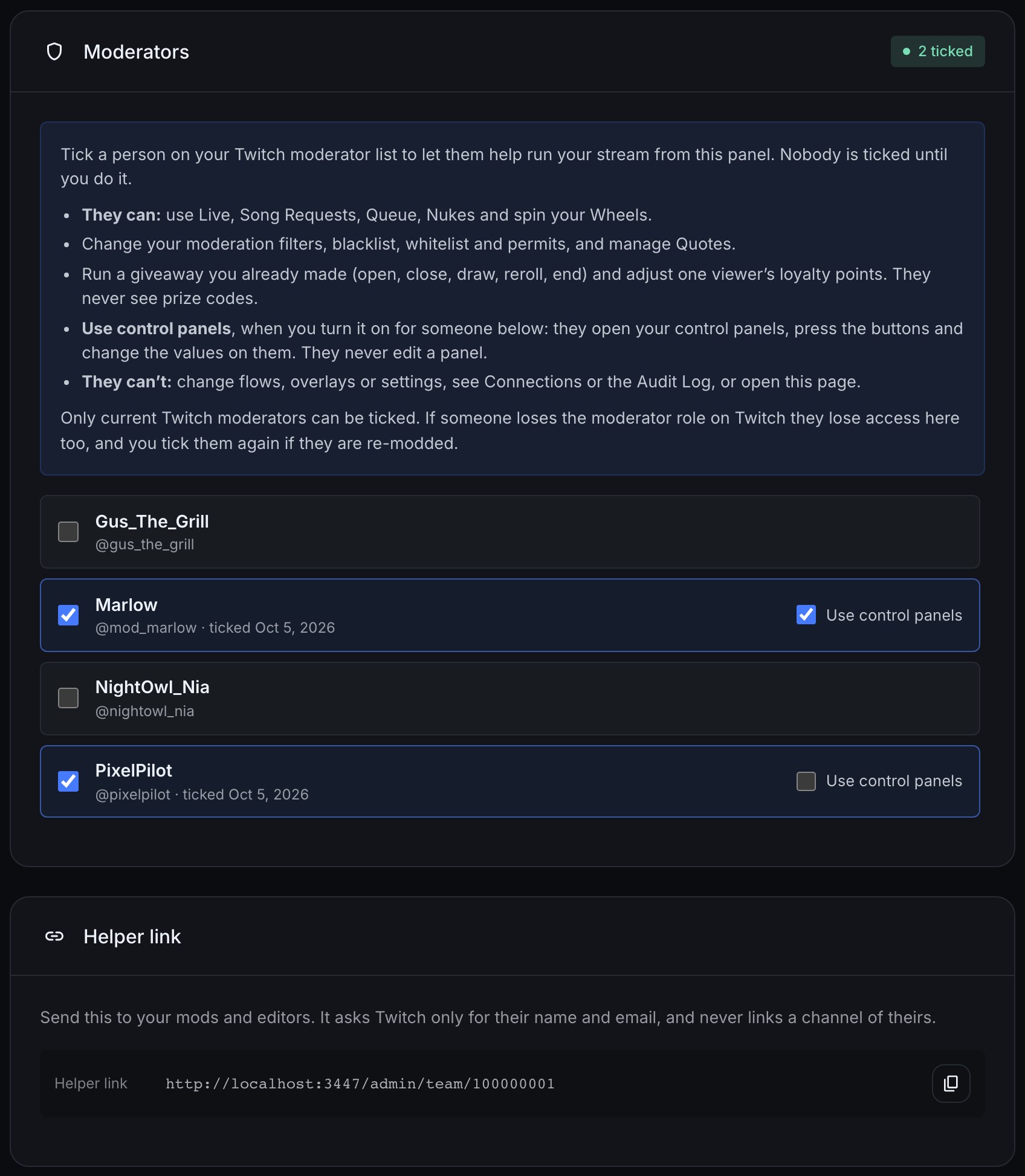
The page has three cards: Editors, Moderators and Helper link.
Let a moderator into your dashboard
Prerequisites: the person must already be a moderator of your channel on Twitch. Bloopbot asks Twitch for your current moderators, so making someone a moderator there is the first step. Moderators are included on every plan, with no limit on how many you tick.
- Open Settings › Team.
- On the Moderators card, wait a moment while it asks Twitch for your moderator list. With eight or more moderators, a Find a moderator box appears above the list.
- Tick the box beside each person you want to let in. The count at the top of the card goes up (2 ticked), and each ticked row shows the date you ticked them.
- Send them the helper link so they can sign in.
Nobody is ticked to begin with, and a new Twitch moderator does not get in until you tick them. The tick asks Twitch again, so someone who has just lost the role cannot be ticked.
Let a moderator use your control panels
Control panels are screens of buttons and controls you build for your stream. A moderator can use them too, so someone else can press Home goal or fix the score while you play. Each moderator needs your say-so first.
Prerequisites: the moderator is ticked on Team, and you have made at least one control panel.
- Open Settings › Team.
- On the Moderators card, find the person. Beside each ticked moderator is a Use control panels box, off to begin with.
- Tick Use control panels. It takes effect at once.
The moderator now sees Control panels in their sidebar. They can open any of your panels, press its buttons and change its variables, on a computer, a phone or in an OBS dock. They cannot make, edit or delete a panel, and a button or control that is not on a panel is not theirs to use: they get only what your panels show.
Everything they do from a panel runs exactly as when you do it, uses the same limits on how fast buttons can be pressed, and appears in Audit log under their name.
To stop it, untick Use control panels. Their next press or change is refused, and any panel they have open says You no longer have access. Unticking the person as a moderator ends it too, and if you tick them again later the box starts off.
Add an editor
Prerequisites: editors come with some plans, and the number you can add depends on your plan: check What your plan includes. Moderators need no plan.
- Open Settings › Team and find the Editors card.
- Type the person’s Twitch username in the Twitch username field and choose Add editor.
- Or, under Or send a link, choose Create invite link and copy the link straight away: it is shown once. Share it privately with the person you intend to add. Each link works once and expires in a week.
- Ask them to sign in with their own Twitch account. With an invite link they choose Accept and open the channel; otherwise they open your helper link or choose your channel from Channels.
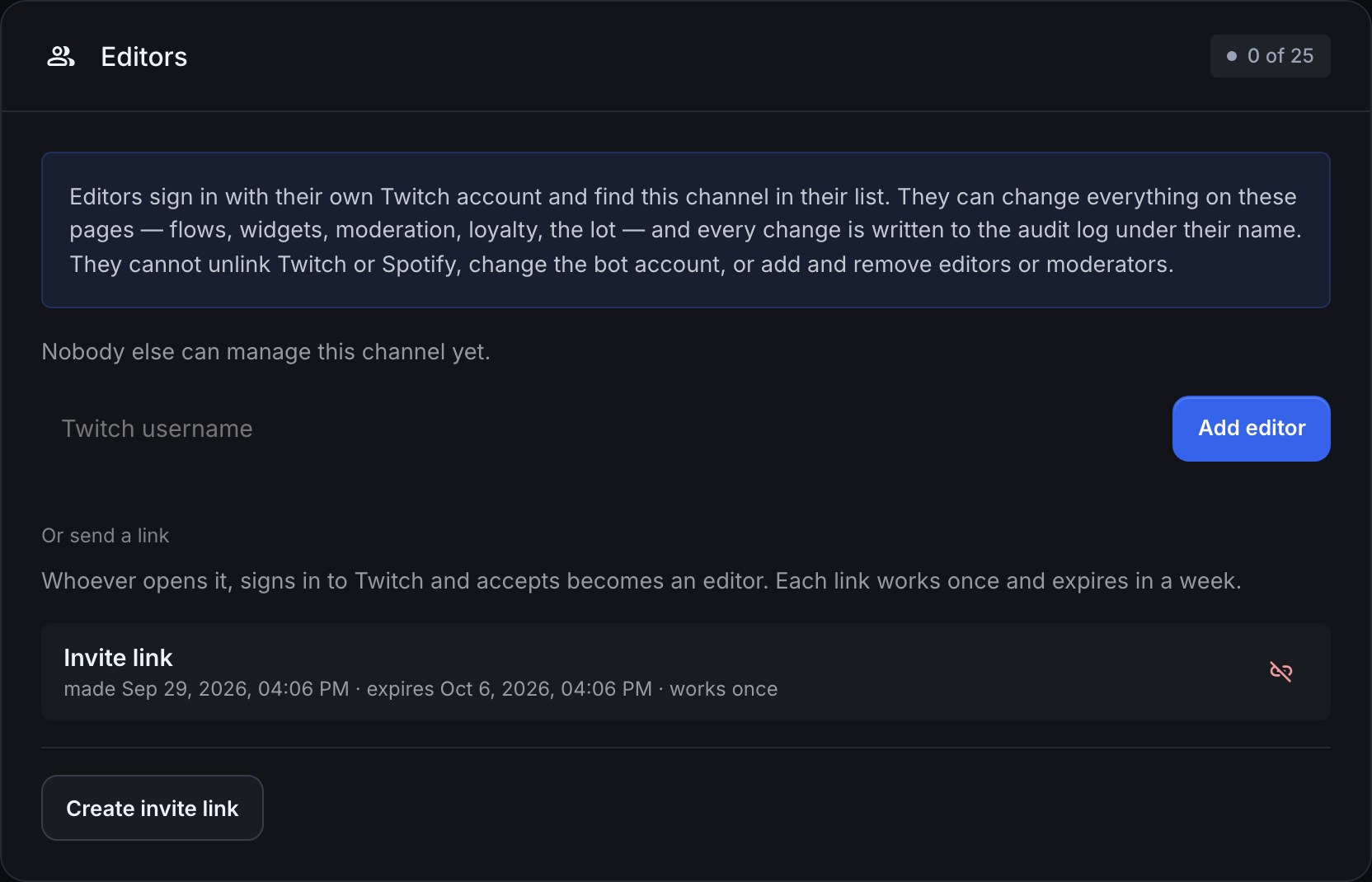
When your plan’s editor limit is reached, the add button reads Editor limit reached with your limit, and Create invite link is unavailable, until you remove someone.
Editors can add their own backup sign-in email under Account, as Keep a backup way to sign in explains.
Send the helper link
The Helper link card shows one address to send to both moderators and editors. Choose the copy icon (Copy the helper link) and send it to them privately.
What your helpers see when they open it:
- Signed out: Bloopbot sends them to Twitch to sign in. Twitch asks only for their name and email address, and nothing else. It does not ask to link a channel of theirs, and it does not set up Bloopbot on their own channel.
- Signed in and on your team (a ticked moderator or an editor): they land in your channel’s dashboard. A moderator opens on Live, with a bar across the top reading Moderator and the name of your channel, and only their pages in the sidebar.
- Signed in but not on your team yet: a page tells them they are not on this channel’s team and to ask you to add them. It never says whether your channel exists.
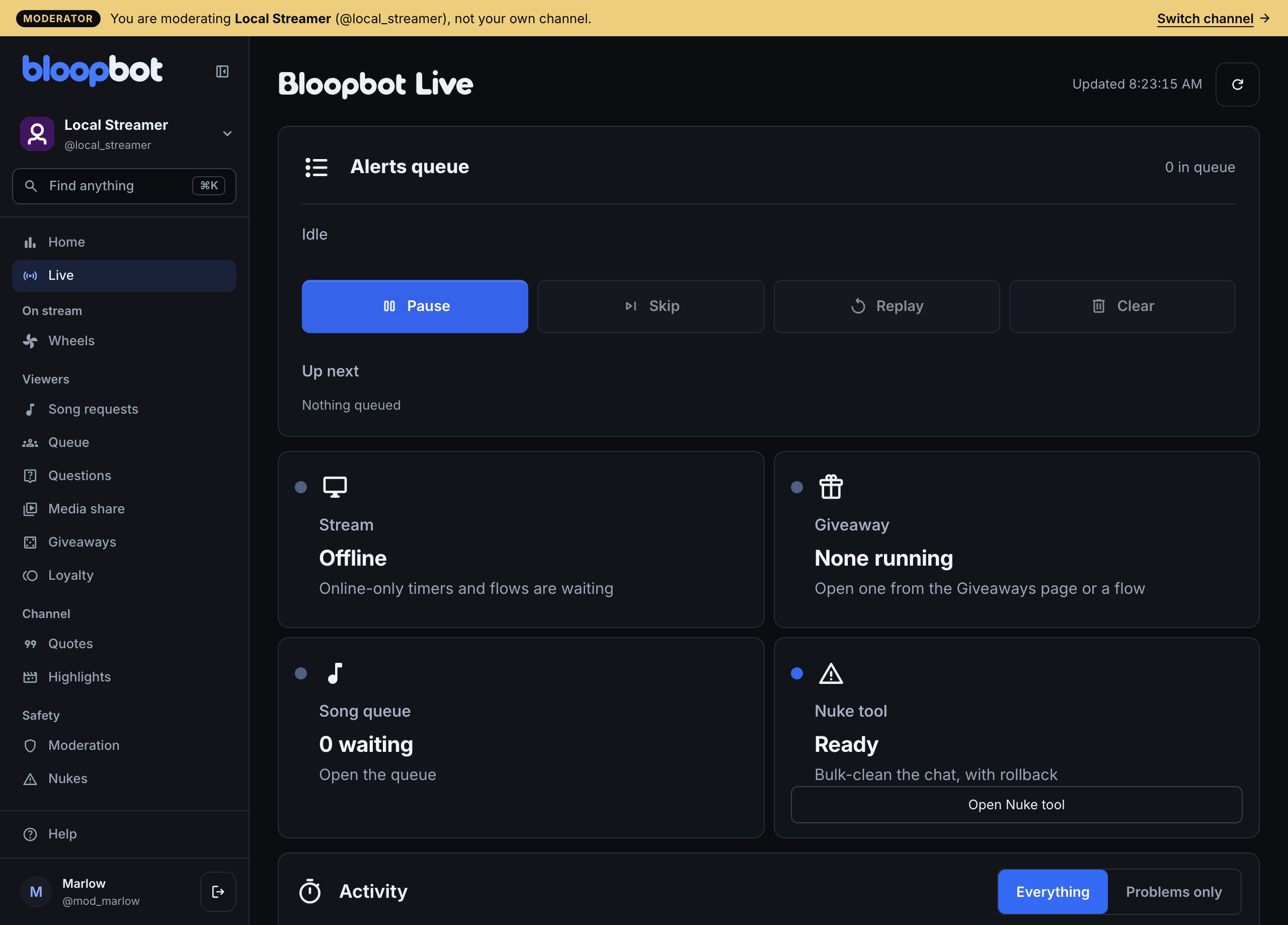
Someone who helps a channel does not have to run Bloopbot on their own. If they stream too, the Overview offers Set up Bloopbot for your own channel (and Channels offers Link Channel) whenever they want it, and that is a separate, full sign-in. The channel switcher lists every channel they help with, moderated ones marked (moderator) and edited ones (editor).
What moderators can do from chat
Bloopbot reads the moderator badge on each chat message, so a moderator on Twitch is a moderator to Bloopbot straight away, with nothing to sign in to. Take the role away on Twitch and their next message counts as an ordinary viewer’s. You, the broadcaster, can do everything a moderator can.
These commands are built in. There is nothing to install, they are not on your Flows page, and anyone below moderator who types one gets no reply at all:
| Command | What it does |
|---|---|
!permit <username> | Lets that viewer post a link past the link filter for the Permit Duration set on it (60 seconds unless you change it) |
!filters | Lists each filter as on or off |
!filters enable <filter> | Switches a filter on; on works too. Filters: blacklist, links, caps, symbols, emotes, repetition |
!filters disable <filter> | Switches a filter off; off works too |
!blacklist | Lists the first ten blacklist entries |
!blacklist add <words> | Adds an entry; add -regex for a pattern, or -timeout=600 for its own timeout in seconds |
!blacklist remove <words> | Removes an entry; del works too |
!whitelist | Lists the domains the link filter allows |
!whitelist add <domain> | Allows links to that domain, for example !whitelist add youtube.com |
!whitelist remove <domain> | Stops allowing it; del works too |
!link | Posts the link for connecting a Twitch account to Bloopbot |
A command from chat changes the same settings you see on Moderation, so a filter a moderator switches off in chat shows as off there too. Out of the box every filter leaves moderators alone; each filter’s Exempt Level on Moderation decides who it skips.
Everything else moderators run is a flow, so you decide what they get. The Mod commands pack holds !nuke, !title, !game, !spin and the alert queue controls, each already checked for moderators, and the giveaway commands in Run a giveaway in chat work the same way, except that cancelling a giveaway is yours alone. To open one of your own flows to moderators, put Who can trigger set to Moderators and up after its trigger, as Make a command moderators-only shows. Everyone at the level you choose and above passes: Moderators and up lets your moderators and you through, and Broadcaster only keeps a command to you alone.
Review or end access
Return to Settings › Team at any time.
- Moderator: untick their box. Their access ends on their very next click, and a live page they already have open stops updating within about half a minute.
- A moderator’s control panels: untick Use control panels beside them. Their open panels stop working straight away, and they keep the rest of their moderator pages.
- Editor: choose the bin icon (Remove) next to their name. Choose the broken-link icon (Revoke) next to a pending invite link to stop it working. This works on every plan: if your plan does not include editors, the card still lists the editors you have, with the same two icons, and only hides the controls for adding more.
- On Twitch: if you remove someone’s moderator role on Twitch, Bloopbot notices and clears their tick as well, so their dashboard access ends with it. The row disappears from your ticked list; if you make them a moderator again later, tick them again. The Audit log records it as a change made by Twitch.
- If Bloopbot checks Twitch and finds a ticked person is no longer a moderator, their row on Team reads no longer a Twitch moderator. Untick it to tidy the list.
Audit log records who ticked and unticked a moderator, who turned Use control panels on or off for them, who added or removed an editor, and the changes made under each editor’s and moderator’s name.
If Bloopbot cannot reach Twitch to confirm your moderators, it never removes anyone’s tick, but your moderators may briefly lose their access until it can check again. Editors and you are not affected, and it clears by itself once Twitch answers.
An example: a mod for game night
You stream game nights and your friend Sam is a Twitch moderator of your channel.
- Open Settings › Team. Moderators lists your Twitch moderators, including Sam.
- Tick Sam’s box. The count reads 1 ticked and Sam’s row shows today’s date.
- Copy the Helper link and send it to Sam.
- Sam opens it, signs in with Twitch (which asks only for a name and an email address) and lands on Live in your channel, under the Moderator bar.
- During the stream Sam skips a song on Song requests, presses Next on Queue and draws your giveaway on Giveaways. The prize codes stay hidden from Sam. Flows and Overlays are not in Sam’s sidebar, and typing their address shows Ask the streamer.
- After the stream you untick Sam. Sam’s next click no longer reaches your channel.
Troubleshooting
- My mod doesn’t see my channel. Check three things: they are a moderator of your channel on Twitch, you have ticked them on Team, and they signed in with the same Twitch account. Ask them to open your helper link again while signed in. If it says they are not on the team yet, one of the first two is missing. Bloopbot moderators are not the same as your chat’s: a Twitch moderator you have not ticked has your chat commands but no dashboard.
- The Twitch mod list won’t load. The Moderators card says Twitch could not be reached. Choose Try again. If it keeps happening, your ticked moderators are still listed and you can still untick them; ticking someone new needs Twitch to answer. If it stays broken, check Connections for a notice asking you to reconnect Twitch.
- A mod is shown as no longer a Twitch moderator. Twitch no longer lists them, so they cannot use their access. If that is a mistake, make them a moderator on Twitch again, then tick them. If it is not, untick them to clear the row.
- My mod sees “Ask the streamer”. That page is one moderators do not use: flows, overlays, settings, Connections and Team stay with you and your editors. If they need a change, make it for them, or make them an editor if your plan includes editors.
- A moderator lost access for a while and then got it back. Bloopbot could not reach Twitch to confirm your moderators, so it held their access until it could. Nothing was changed or removed.
- The Add editor button is disabled. You have reached your plan’s editor limit, or editors are not part of your plan. What your plan includes shows what your channel holds.
- A helper is asked for more than their name and email. The helper link asks Twitch for nothing else. If they see a longer list of permissions, they started from a different address: send them the Helper link from Team again.
Was this guide helpful?
Thanks. Your answer helps us decide which guides to improve.