
Automate your stream without writing code
Templates and text commands only go so far. When you want "if a subscriber redeems this, check that, then play an alert", you need logic. These five bots are ranked by how much logic you can build without code, and how easy it is to read later.
We make Bloopbot, so read our pick with that in mind. Every other bot's details come from its own pages, checked September 2026.
The short answer
| Where it runs | How you build logic | Code needed for custom work | Overlays included | Best for | |
|---|---|---|---|---|---|
| 1. Bloopbot | Cloud | A canvas of triggers, checks and actions | No; a Web request step for your own backend | Yes, hosted | Visual automation that keeps running when your PC is off |
| 2. Streamer.bot | Your Windows PC | Lists of sub-actions | C# | Build your own | Controlling OBS and apps on your PC |
| 3. Fossabot | Cloud | Text templates with $(variable) tokens | $(customapi) to your own backend | No | Developers with their own API |
| 4. Nightbot | Cloud | Commands with $(variables) | $(urlfetch) | No | Simple dynamic replies |
| 5. Streamlabs Cloudbot | Cloud | Custom commands with variables | Not covered here | Through the Streamlabs suite | Streamlabs users |
Templates, panels or a canvas?
A template bot gives each command one line of text with tokens in it. It's fast, but logic gets crammed into tokens. A panel bot gives you forms. A canvas bot shows each step as a box you can follow from trigger to action, with a yes path and a no path for every check. Canvases take a minute longer to learn and are much easier to read a month later.
1. Bloopbot: best visual automation in the cloud
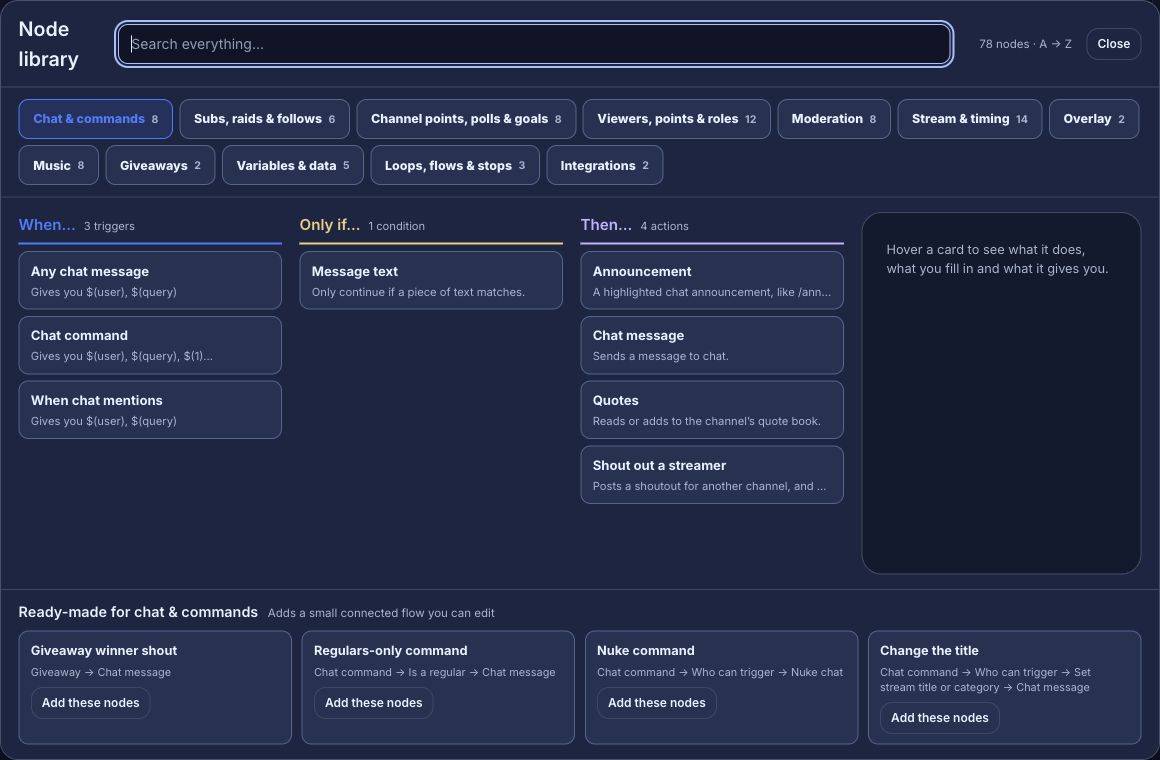
Every command, alert and timer in Bloopbot is a flow: a trigger, optional checks, and actions.
- Real logic, drawn. Check steps branch yes or no. For each loops over a list. Variables are declared once and read anywhere as
$(var.name). - Triggers beyond chat. Chat commands, timers, channel-point rewards, follows, subs, raids, a burst of follows and webhooks you can call from anything.
- Reusable pieces. Group steps several flows share into a node group, and install ready-made flow packs instead of starting from nothing.
- AI as a check, not a writer. An AI step answers a question about a message, such as "is this text OK to show on stream?", and your flow takes the path you wired. It never writes what viewers read. AI steps may not be included on your plan.
- Test before you trust it. Test fire runs a flow, and the Run log shows every step it took.
- Runs without your PC. Flows live on Bloopbot's servers and keep answering when your PC is off.
An example: a reward where viewers type a message for the screen. On a reward redeemed → AI: text OK to show? → clean text plays your alert with their message; flagged text never reaches the screen and the points are refunded.
Where it falls short: It can't reach into your PC to switch OBS scenes or drive VTube Studio, and it's Twitch only.
2. Streamer.bot: most powerful, if you're on Windows
Streamer.bot builds actions from lists of sub-actions, with If/Else, Switch and While, and C# for anything custom. It controls OBS, Stream Deck, VTube Studio, Voicemod and more, and supports Twitch, YouTube, Kick and Trovo. It runs on your Windows PC, which has to stay on.
Pick it if your automation is about your PC, not your chat. Many streamers run both: Streamer.bot for the PC, Bloopbot for chat. Streamer.bot vs Bloopbot maps one onto the other.
3. Fossabot: best for calling your own API
Fossabot's commands are text templates, and $(customapi) hands logic to a server you run. That's powerful if you're a developer, and it's code, just somewhere else.
4. Nightbot: best simple dynamic replies
Nightbot's $(variables) and $(urlfetch) cover counters and fetched replies with very little setup.
5. Streamlabs Cloudbot: best inside Streamlabs
Cloudbot has custom commands with variables, loyalty, giveaways, polls and quotes, inside the Streamlabs suite.
Which one should you pick?
- You want logic you can see, running in the cloud: Bloopbot.
- You want the bot to drive your PC: Streamer.bot.
- You already run your own API: Fossabot, or a Web request step in Bloopbot.
- One-line replies are enough: Nightbot.
Draw your first flow.
Sign in with Twitch, install the Starter pack and change one step.