
Configure loyalty
For a new guided-setup channel, earning starts off; switch it on only if you want Bloopbot to award points. Channels using the earlier setup start with points on, and switching setup experiences preserves your existing choice. Open Loyalty to review what viewers earn, their watch time and balances. You can switch points off there at any time, then press Save Changes. The switch alone edits a draft; the status says not saved until you save. Save Changes stays in the bar above Master Settings while you review the page. Bloopbot loyalty points are separate from Twitch Channel Points.
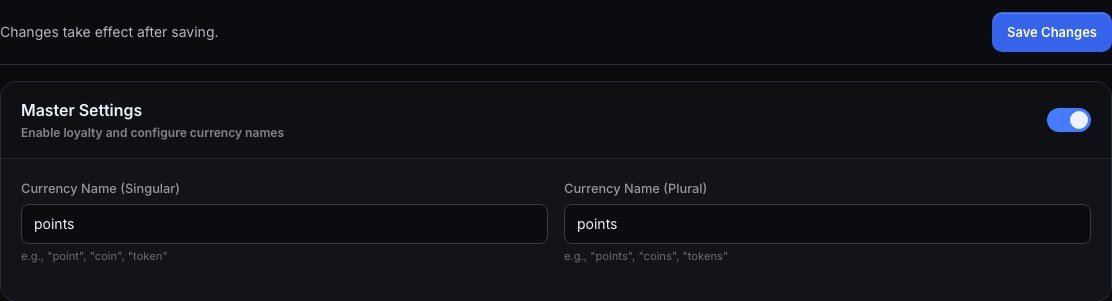
- Make sure your bot account can read chatters: connect it with Twitch’s requested permissions and make it a moderator in your channel. Until it is, payouts for watching are paused and the Loyalty page says so.
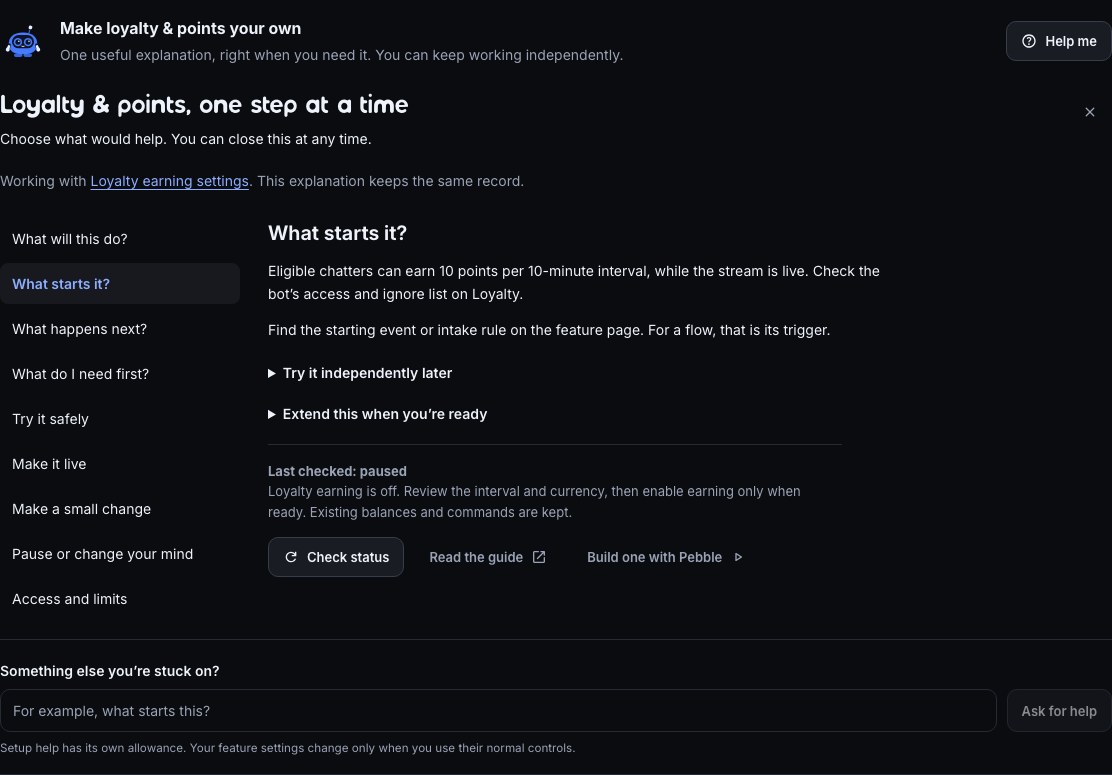
- On Loyalty, review the points per interval and how often to award them. Keep the defaults if they suit you; press Save Changes when you actually edit a setting. If you previously switched points off, switch them back on. If you want points while your stream is offline, switch on Offline earning.
- Later, during a real stream, have a viewer join chat and wait one eligible interval. Look them up under Viewer Parameters to check their balance and last payout. This verifies earning; you can prepare the balance command below right away.
Watch time counts presence in chat at each payout, in whole earning intervals. With a 10-minute interval, a viewer who qualifies for a payout gains 10 minutes of watch time. This includes offline chat time when Offline earning is on. With that setting off (the default), only live intervals count. Switching it off leaves previously counted time in place.
If a viewer appears with 0 points after chatting, that only confirms they joined the loyalty system. Check that points are enabled, your bot account can read chatters, the viewer is not on the ignore list, and the stream is live unless Offline earning is on. Then wait for the next interval. A chat command such as !points only answers when its flow is enabled below.
Give viewers a way to check points
- Look in Flows for an existing balance command. Keep its name and custom reply if they already suit you.
- If needed, on Loyalty press Add on the Points commands row. Review Check points, then press Add 1 flow — paused. It adds only the balance-reading command.
- Open that flow and review its command trigger, Read points & watch time and Chat message. Use Test fire to preview the reply; it does not award points.
- Use the flow’s Live switch when ready. A paused existing command can be opened from the row too; reuse it instead of adding another.
The other Loyalty pack members are optional. Find them in Marketplace when you want watch time, a leaderboard or gifting. Review and enable only the ones you want; a points-only setup does not need them.
!points (with no name, or !points <name>) answers with a balance and, once someone has earned any, their rank — @viewer PixelPal has 1,250 coins (Rank #2). A viewer nobody has seen yet, or one who has spent down to nothing, gets @viewer PixelPal has no points yet. !watchtime answers the same way with the time they have watched. !top is the leaderboard, and !give <name> <amount> passes the full amount to another viewer, with one success or insufficient-points reply. If two gifts arrive together and only one is affordable, only that gift succeeds; the other reply shows the sender's remaining balance. A refused or failed transfer moves no points. The recipient's lifetime earned increases by the gift; the sender's lifetime earned stays the same.
Mods have three commands, each its own flow: !addpoints <name> <amount> gives a positive amount by hand, !setpoints <name> <amount> sets a balance exactly (down to 0 if you set it lower), and !removepoints <name> <amount> takes an amount away — a balance never goes below zero, it just stops there. A usage line answers a command typed with no name or no amount; typing a name that is not a Twitch account, not a positive number, or (for !give) your own name, is refused without a reply, the same way a cooldown or a permission check refuses quietly elsewhere in Flows.
A viewer joins the loyalty system when they first chat after loyalty is switched on, when they are paid for watching, or when someone gives them points. Chatting adds them with a 0 balance; points only arrive when an earning rule pays them. You don’t have to wait for the first payout: !give, !addpoints, !setpoints and !removepoints all work on any viewer, and add them if they aren’t in it yet: a Twitch viewer from a Twitch command, a Kick viewer from a Kick command or on a Kick channel. !addpoints newface 100 gives a viewer who arrived a minute ago 100 points, and !removepoints on someone new adds them with 0. The same goes for Adjust balance on the Loyalty page, which a moderator you have let in on Team can use too, though not the settings. A viewer on your ignore list is never added by chat or these adjustments.
Point adjustments should keep their moderator checks. Inspect an Add points, Set points or Remove points flow before enabling it.
Give another viewer points in a flow
Use Transfer points when one viewer gives their points to another. Points must be on, and the flow must have a viewer who triggered it, such as someone typing a command. A timer has no viewer to pay for it. The recipient must be a real viewer on that command's platform and must not be on your ignore list.
- Open your gift flow, or add Give points from the Loyalty pack.
- Add Transfer points from the node picker. Set Give to to the recipient's login, or
$(1)for a command's first argument. - Set Amount to a positive whole number, or
$(2)for the second argument. Plain digits work here; the built-in Give points flow uses Read a number first. - Connect ok to your success message. Connect refused to the response you want. For an insufficient-points reply, check that Why it was refused is
not_enoughand insert Sender points, written out from this transfer step. - If you are replacing a customized gift, remove both the old sender subtraction and recipient addition, then connect their surrounding steps to the transfer. Set a variable and Spend points each do their own work; two separate steps do not make one transfer.
- Save, then use Test fire to inspect the branches. It simulates the transfer without moving points or checking whether the real balance can afford it. Check a real gift in chat and look up both viewers on Loyalty to verify their balances.
For example, with 10 points, !give friend 8 leaves the sender with 2 and gives Friend 8. Another gift of 8 is refused and reports 2. With points off, an ignored recipient, your own name, an unknown viewer or an invalid amount, the built-in command stops quietly. An error at the transfer step leaves both balances unchanged; open its run to see the error.
Charge points in a flow
Use the Spend points step to make something in a flow cost points — a command that redeems a perk, a wager in a minigame, a queue-skip item. It takes the cost off a viewer's balance and tells the flow whether it went through, so you can react either way. A spend never takes a balance below zero, and it is safe from two viewers spending at the same instant: if only one of them can actually afford it, only one succeeds.
- Open the flow where something should cost points, or start a new one from + New flow.
- Add a Spend points step — search "spend" or "points" in the node picker.
- Set Cost to how many points it should take: a number, or a variable like
$(1)to let the command itself say it (!wager 50). - Leave Whose points on "The viewer who triggered this" for a command a viewer pays for themselves, or choose "A named viewer" to charge someone else's balance.
- Wire the ok branch to whatever the cost buys — a chat reply, a redemption, a wheel spin, a queue entry.
- Wire the not_enough branch to a reply that says it didn't go through.
Example: a !hydrate command that costs 50 points and posts a chat line either way.
- Trigger: Command, name
hydrate. - Spend points: Cost
50, Whose points "The viewer who triggered this". - Off ok, add a Chat message and type
$(user) drank some water! -50 points, left.— with a gap at the end. Drag Balance from the Spend points step's tray into that gap, or place the caret there and use Insert… instead: either way it becomes a chip reading Spend points › Balance, so the line reads$(user) drank some water! -50 points,followed by that chip, thenleft. - Off not_enough, add a Chat message:
$(user) doesn't have 50 points yet.
Try it once as a viewer with enough points, then again as one without, to see both branches fire. Balance is always the number to show afterwards — the new balance on success, or the balance they still have when it fails — so the same dragged value reads correctly whichever branch runs, as long as you take it from the Spend points step itself. Loyalty points must be switched on (Configure loyalty) for a spend to succeed; with points off, or for a viewer the loyalty system has never seen, it takes the not_enough branch too.
To let viewers spend points on items you set up — from chat with !buy or from a web store — use the store instead of drawing each one: Let viewers spend points in a store.
Award points per gifted sub or per 100 bits
A fixed amount is one Set a variable step that adds to loyalty_balance. To give more for a bigger gift or a bigger cheer, put a Do some maths step in front of it: it works out a number from two others — times, divided by, plus or minus — and hands The result to the next step. It says nothing in chat and changes nothing on its own.
Example: award 10 points per gifted sub, so a viewer who gifts 5 subs gets 50.
- Press + New flow and pick the Gifted subs trigger.
- Add a Do some maths step — search "maths" or "per gift" in the node picker. Set First number to
$(count)(how many subs were gifted), Do to Times and Second number to10. - Add a Set a variable step after it: Variable
loyalty_balance, Do Add, Write to "The viewer who triggered this". Then drag The result from the Do some maths step's tray onto the Set a variable card and pick Value: it lands as$(from.<step>.result). - Save the flow and switch it on.
Expected result: a real eligible gift of 5 subs credits the gifter 50 points, and their lifetime total rises by the same amount. Test fire only previews the planned write; it does not change the real balance. An anonymous gift has no viewer to credit, so nothing is added.
For 1 point per full 100 bits, start from Bits cheered instead and use two maths steps: the first is $(bits) Divided by 100 with Round down to a whole number on, so 250 bits counts as 2; the second is The result of the first Times your amount. Round down before you multiply — 150 bits at 10 points per 100 is 10 points that way, and 15 the other way round.
A cheer under 100 bits works out to 0. To skip the write entirely when there is nothing to add, put a Check a value step before Set a variable: The result, More than, 0.
Troubleshooting: if the flow stops at the maths step, open the run on Flows — the step says which number was not a number (a $(count) on a trigger that has no gift count, say), or that it was asked to divide by zero. Drag a step off its error output to handle that in the flow instead.
Older points steps that credit the triggering viewer also check whether there is someone to credit. With no viewer, they leave points alone and continue to the following step. This covers fixed awards, deductions and setting a balance as well as gifts or bits.
If a flow you already saved stops at a viewer's Set a variable step on an anonymous gift or a timer, add this check yourself:
- Put Read points & watch time before the write, reading the viewer who triggered the flow.
- Follow it with Check a value: drag There is someone to read from the read step into the first value, choose Equals, and compare it with
true. - Connect true to the write and false to whatever follows the write. For a deduction, skip its floor-at-zero step too.
- Save and test an event without a viewer. The next step should run and no balance should change.
An existing Set a variable step keeps its settings; it is not automatically given this check.
Look up a viewer
Open Loyalty and find Viewer Parameters. Type a viewer’s username into the search box — the @ is optional — and press Search. Bloopbot answers with every value it holds for that person, under their display name:
| What you see | What it means |
|---|---|
| Balance | The points they can spend right now. |
| Lifetime earned | Every point they have ever earned, including the ones they have already spent. |
| Watch time | Time counted from qualifying intervals in chat, including offline intervals if Offline earning is on, shown as hours and minutes — 3h 20m. |
| Subscriber | Yes or No: whether they count as a subscriber, including a gifted sub. The subscriber multiplier stops when their sub ends. |
| Last payout | The date and time they were last paid loyalty points. |
These values belong to the viewer, not the channel: each person has their own balance, watch time and the rest, and every one of them is also a variable a flow can read. The table’s Use it in a flow column shows the token — $(var.loyalty_balance), $(var.loyalty_lifetime_earned), $(var.loyalty_watch_seconds), $(var.loyalty_is_subscriber) or $(var.loyalty_last_payout_at) — so $(var.loyalty_balance) in a chat message says the balance of the viewer the flow is running for. Watch time is the one to read carefully: the page shows hours and minutes, while loyalty_watch_seconds counts seconds. Any other per-viewer value your flows keep appears in the same table.
Try it with your own username. Expected result: your display name, your balance and your watch time appear. A viewer Bloopbot has not counted yet comes back as No viewer called “…” in this channel yet — check the spelling, and remember that someone appears here once they have chatted with loyalty on, earned points or watched.
The search only shows these values. To change a balance, use Adjust beside that viewer on the Leaderboard below, or set it from an Add points, Set points or Remove points flow.
On a Kick channel the search finds Kick viewers. On a Twitch channel with Kick added, a Twitch viewer and a Kick viewer can share a name, and they are two viewers with their own points. The search then shows every viewer by that name, each with a small Twitch or Kick mark, Twitch first. Adjust always changes the viewer on the row you pick, so giving the Kick bob 100 points never touches the Twitch bob.
Recognise regular viewers
Regulars is a list of viewers you name yourself, kept on the Regulars page under Viewers. Flows check it with a Has a role step, and moderation filters can let regulars through.
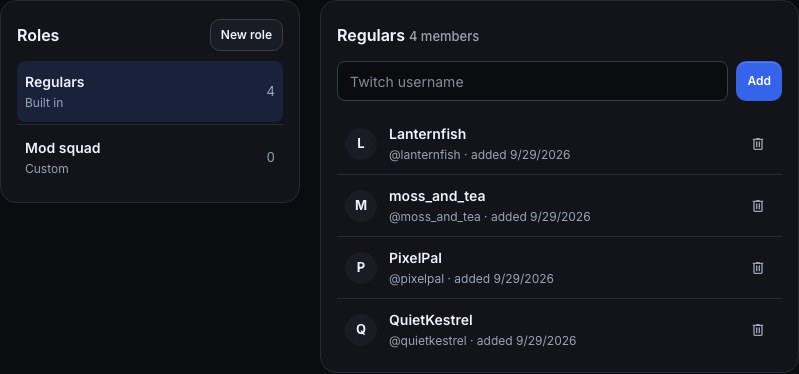
To add someone from the dashboard:
- Open Regulars. It opens on the built-in Regulars list.
- Type their Twitch username, with or without the
@, and choose Add. - They appear in the list straight away. The bin icon (Remove) beside a name takes them off again.
If you type a name Twitch doesn’t know, the page says No Twitch user called … and adds nobody. Check the spelling and try again.
To let your moderators manage the list from chat, you need the three !regulars flows: !regulars add <name>, !regulars remove <name> (also !regulars delete), and a bare !regulars, which answers Regulars: 12. Only moderators and you can use them. Until a flow that adds or removes regulars is on, the Regulars page shows a !regulars commands row above the list:
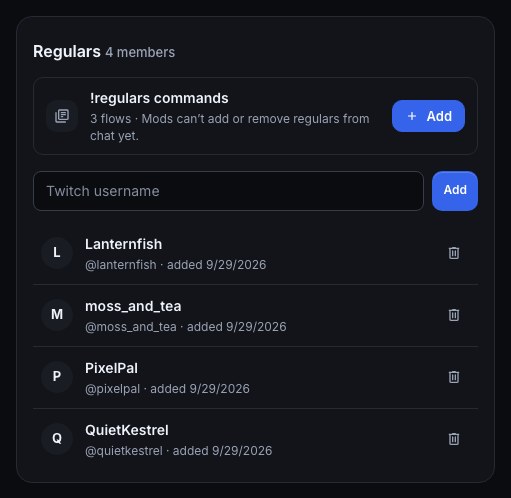
- Press Add on the row. The review opens on the right of the page: Adds 3 flows to your channel. They start paused — nothing runs until you switch them on.
- Press Add 3 flows — paused. The review turns into Added — paused, with Set it up: Choose flows to switch on opens them in Flows if you want to look first.
- Close the panel. The row now says the flows are paused: press Switch on. The row goes away once they are on. Type
!regulars addfollowed by a viewer’s name in your chat to check: they appear on the page.
If you already have a !regulars flow and it is paused, the row names it instead, with Open flow and Switch on, so you never end up with two copies answering the same command.
Use the Regulars-only command template, or add a Has a role step to your own flow with Roles left at Regulars, to give this group a special command. New role makes a list of your own, such as Mod squad, which a Has a role step can check by name in the same way.
Verify a reward
Use Test fire to inspect the connected reward action, then verify a real event and the resulting balance on Loyalty — search that viewer under Viewer Parameters to see it. Dry runs do not award real points. If a reward fires twice, inspect other enabled flows listening to the same trigger.
Was this guide helpful?
Thanks. Your answer helps us decide which guides to improve.