
1. Start from Simple command
Build your first flow in the footer of the public site opens this guide. To follow along, connect your Twitch channel first, then choose the channel you want to build for in the dashboard.
- Open your channel’s Flows page, then Packs → Starter. Starter is added automatically once for channels using the earlier setup, with new flows paused. A new guided-setup channel chooses its tools: if Starter is absent, use Marketplace to add just Simple command, or choose Starter if you want the pack.
- Open Simple command. If you removed it, press Add and choose the Simple command template to add it again.
- Give the flow a recognisable name, such as “Hello command”. The flow name is for you; the Command field controls what viewers type.
2. Set the command and reply
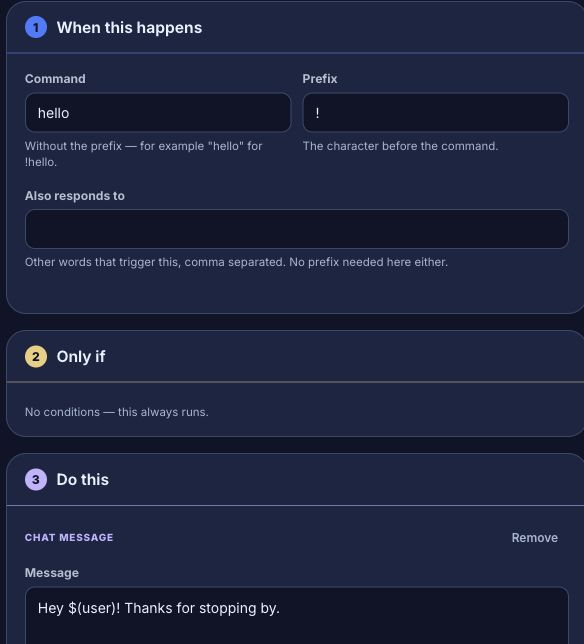
In the Simple view, set Command to hello. Prefix, under More options in the same step, already reads !; leave it, and do not type the exclamation mark into Command as well. In Do this → Message, enter:
Hey $(user)! Thanks for stopping by.The bot replaces $(user) with the person who triggered the command. Leave Send as set to A normal message, or choose a mention or A reply in the original chat. For YouTube, follow Make a YouTube command reply: choose its platform on the trigger, and replies appear as ordinary messages in the original YouTube live chat.
3. Add another way to trigger it
In Also responds to, enter hi, hey. Viewers can now use !hello, !hi or !hey. Enter the words without the prefix, separated by commas.
4. Split one command into several flows
Subcommand, under More options on the trigger, makes a command trigger only when a specific word comes right after it, so several flows can share one command name without stepping on each other. For example, one flow could handle !lurk on its own and a different flow could handle !lurk back — each with its own message and its own conditions.
- Set Command to
lurkon both flows. - On the first flow, leave Subcommand blank. It answers a bare
!lurkand any word after it that no other flow claims — a useful fallback for a general lurk message. - On the second flow, enter
backin Subcommand. It now answers only!lurk back, never a bare!lurk. - Save both. Type
!lurkalone and only the first flow replies; type!lurk backand only the second one does.
To match more than one word, separate them with commas or spaces — open start and open, start both give a flow two subcommand words.
The subcommand word does not change how the rest of the message is read: it is still $(1), and whatever follows it is $(2) and onward, exactly as if Subcommand were empty. Word matching ignores case, so !lurk BACK matches a subcommand of back.
5. Name the words after a command
$(1), $(2) and so on are the words typed after the command, by position. When a command takes several, give them names so the message reads clearly and a control panel button can fill them too. This suits a command such as !goal home Saka 23.
- Select the command trigger. In its settings, under Arguments, select Add an argument three times and name them
team,scorerandminute. Setminute’s type to Number. - In Do this → Message, enter:
GOAL for $(input.team)! $(input.scorer) scores in minute $(input.minute).- Save. Typing
!goal home Saka 23now fills team withhome, scorer withSakaand minute with23.
The words fill the arguments in the order you list them, and the last argument takes the rest of the line. So keep the one that holds a name or a sentence last: with team and scorer, !goal home Bukayo Saka fills scorer with Bukayo Saka.
- A word you leave out uses the argument’s default, and is empty when it has none. Fill in the default under the argument, for example
homefor team. - Number arguments only accept a plain number such as
12,-3or2.5. Anything else, such assoon, comes out empty rather than as0or the default. - Yes/no arguments accept
on,off,yes,no,true,false,1,0,yandn, in any case. Anything else comes out empty. - A subcommand word is not an argument. If you set a Subcommand (section 4) such as
open, the arguments start after it:!giveaway open 5fills the first argument with5, and$(1)is stillopen. $(1),$(2)and the rest keep working exactly as before, so a flow you already have is unchanged until you add an argument.
Pick an argument from the Insert… menu under Inputs · Chat command, or type $(input.team). On the canvas, each argument also has its own port on the command’s card: drag it onto a step to put $(input.team) there. If you use $(input.…) with a name no argument has, Save refuses the flow and names the step. If the flow also has a Run button trigger, give it the same names as inputs. Without them, pressing Run starts the flow with those values empty, and saving warns you. Adding a Run button from a control panel copies the arguments across for you.
The time is available to any flow too. $(now) is the current time as a number of milliseconds, the same from every trigger. See Keep a counter with variables for what to do with it.
6. Point viewers at your Commands page
Your channel has a public Commands page that lists the commands viewers can use, grouped by who can use them (show your chat commands covers which groups it lists). To have chat share it, open Flows → Packs → Starter, open Commands link and turn it on. If you removed it, press Add and add Commands link again. Its command is !commands and its reply is:
Here are my commands: $(commandsurl)$(commandsurl) is the address of your Commands page, filled in when the flow runs. It uses your own domain once one is serving your public page, and you can put it in any text your flows send, from any trigger: a timed message, a follow greeting or your own command. Test fire fills it in as well, so you can see the address before you go live. If the address can’t be found, the token comes out empty. To change what viewers see when they use !commands, edit the reply like any other message.
7. Save and check the result
- Press Save after editing.
- Press Test fire and expand the Run log to inspect the simulated result. This does not send a Twitch message.
- Enable the flow if it is paused.
- Type
!helloin your Twitch chat. You should see your personalised reply.
No reply? Check the troubleshooting guide. For a moderators-only command, add a permission condition.
Chat events have reserved capacity while timer work is busy, so a timer backlog can keep draining without making your command wait behind every reminder. Twitch rate limits and slow actions can still delay the reply.
Was this guide helpful?
Thanks. Your answer helps us decide which guides to improve.