
Get help with your setup
Optional Help me uses your existing declarations. Review a variable’s type, scope, initial value and reset policy before editing; declaring a value is separate from running a flow that changes it. Guidance never increments, resets or changes a current value for practice.
1. Declare what you want to remember
Open Variables and declare a variable with key deaths, a number type, channel scope and a starting value of 0. Choose its reset policy deliberately: keep it across streams for a running total, or use a stream reset for a session count.
Channel scope stores one value for the stream. Viewer scope stores a separate value for each viewer. Use channel scope for a shared death counter.
A text variable holds up to 10,000 characters. Anything past that is cut off when it is saved, including text added with append.
2. Change it from a flow
Build a command flow, add a permission check if only moderators should change the number, and add Set a variable from the node library. Choose deaths, use the add operation and set Value to 1. Follow it with a Chat message action:
Death count: $(var.deaths)Save the flow and inspect a test run. The dry run does not persist changes to your real counter. Trigger the enabled command in chat, then check its value on Variables.
Put a variable token in the flow's own message field to show its value. Text a viewer supplies stays as they typed it: if a flow repeats their message or reward input and they type $(var.deaths), the bot repeats those characters rather than reading your counter. Test runs follow the same rule.
Or start from the Counter templates
If a death counter is all you need, the Counter and Counter: add one (!deaths +) templates in the Starter pack build steps 1 and 2 for you as two small flows. Add them from Flows → Add, with Starter or each on its own, and let the review declare deaths.
| Type in chat | Who | What the bot does |
|---|---|---|
!deaths | Anyone | Says Deaths: 12 |
!deaths + | Mods | Adds one and says Deaths: 13 |
!deaths add | Mods | The same, either word works |
!deaths + | Viewers | Nothing — mods only, and it says nothing to anyone else |
The two flows are told apart by the command’s Subcommand field, not a step inside either graph: the add flow answers only + and add, and the show flow is the fallback that runs for everything else typed after !deaths, including nothing at all. To count something else, open both installed flows and change the command word on their triggers, the variable on the add flow’s Set variable step, and the words in both chat lines.
Want !deaths - to take one away, or !deaths set 0 to start over? Duplicate the add flow, change its trigger’s Subcommand to - (or set) and its Set variable step’s operation to subtract (or set). A copy that reads the typed amount instead of always adding one needs a Read a number step reading $(2) in front of Set variable, with its If it’s blank, use set to 1.
Keeping a list? Convert it to a collection
A text variable works as a makeshift list, such as one entry per card a viewer owns, but a flow cannot remove one entry, count them or check for a single item. On a text variable's row, the Convert to a collection icon splits each value into items, counts repeats ("A, A, B" becomes A ×2 and B) and makes a collection from it. The variable stays as it is, so no flow breaks; delete it yourself once your flows use the collection's steps.
Change several variables at once
- On Variables, press Select above the list. A box appears on each row except the reserved ones, and Select becomes Done.
- Tick the variables you want. Hold Shift and tick another row to take every row between the two; the box at the start of the toolbar ticks every variable the filter shows, on every page.
- In the bar at the bottom, choose Set value, Reset or the bin icon (Delete selected variables).
Set value gives every ticked variable the same value, so it needs channel variables of one type: all numbers, all text or all on/off. Type the value and press Set all. Reset puts each one back to its own starting value. Delete asks first and names any that flows still use. Press Done to hide the boxes again.
For example, tick deaths and wins, choose Set value, type 0 and press Set all to start both counts again in one go.
3. Reuse the value
| Value | Use |
|---|---|
$(var.deaths) | A channel variable you declared |
$(var.user.streak) | A viewer variable named streak, in a viewer context |
$(data.last_raid.viewers) | Channel data recorded by the bot |
$(now) | The current time as a number of milliseconds, from any trigger |
$(platform) | twitch or kick: where the trigger came from. Empty for a timer or a button press |
Use the editor’s Insert… menu to pick data available in the current flow. A viewer variable needs a viewer context; a timer does not inherently identify a viewer.
$(now) is the same kind of number from every trigger, so it works anywhere you can type a token, with no viewer or event needed. It is a number of milliseconds (1800000000123), meant to be stored rather than read: set a variable to $(now) when something happens, then later give that variable to a Format a time step, which says how long ago it was (“2 minutes ago”) or what clock time it was. Test fire fills $(now) with the real current time, since reading the clock changes nothing.
To see what the bot is keeping right now, open Variables and switch to the Channel data tab. Type in Find a value or token to narrow it down (raid, say), or open a group such as Stream to see each value beside its token. The list starts with what changed most recently, with how long ago on the right; choose A–Z to list it by name instead. Click a token to copy it, ready to paste into a message. The Your variables tab lists what you declared: its filter appears once you have more than eight, and a long list splits into pages of twenty.
A value can also start a flow. Choose the Variable changes trigger, pick the variable under Watch, and set Runs when it: Crosses a threshold runs once as the value passes it — At least 100, say — and not again until it drops back; Changes at all runs on every write; Lands on a value runs when it becomes exactly the value you give. The Goal: reached! flow in the On-screen numbers pack works this way, celebrating in chat the moment goal reaches 100.
Watch is not limited to your own variables: it lists everything the bot remembers on its own too, grouped the way Insert… groups it. Click the box and type to search — followers, bits, raid — and each entry shows its value right now, once the bot has recorded one. So a flow can run when Channel → Followers crosses 1000, when This stream so far → Bits reaches 500, or whenever Last raid → When changes. A time such as When can only be watched with Changes at all.
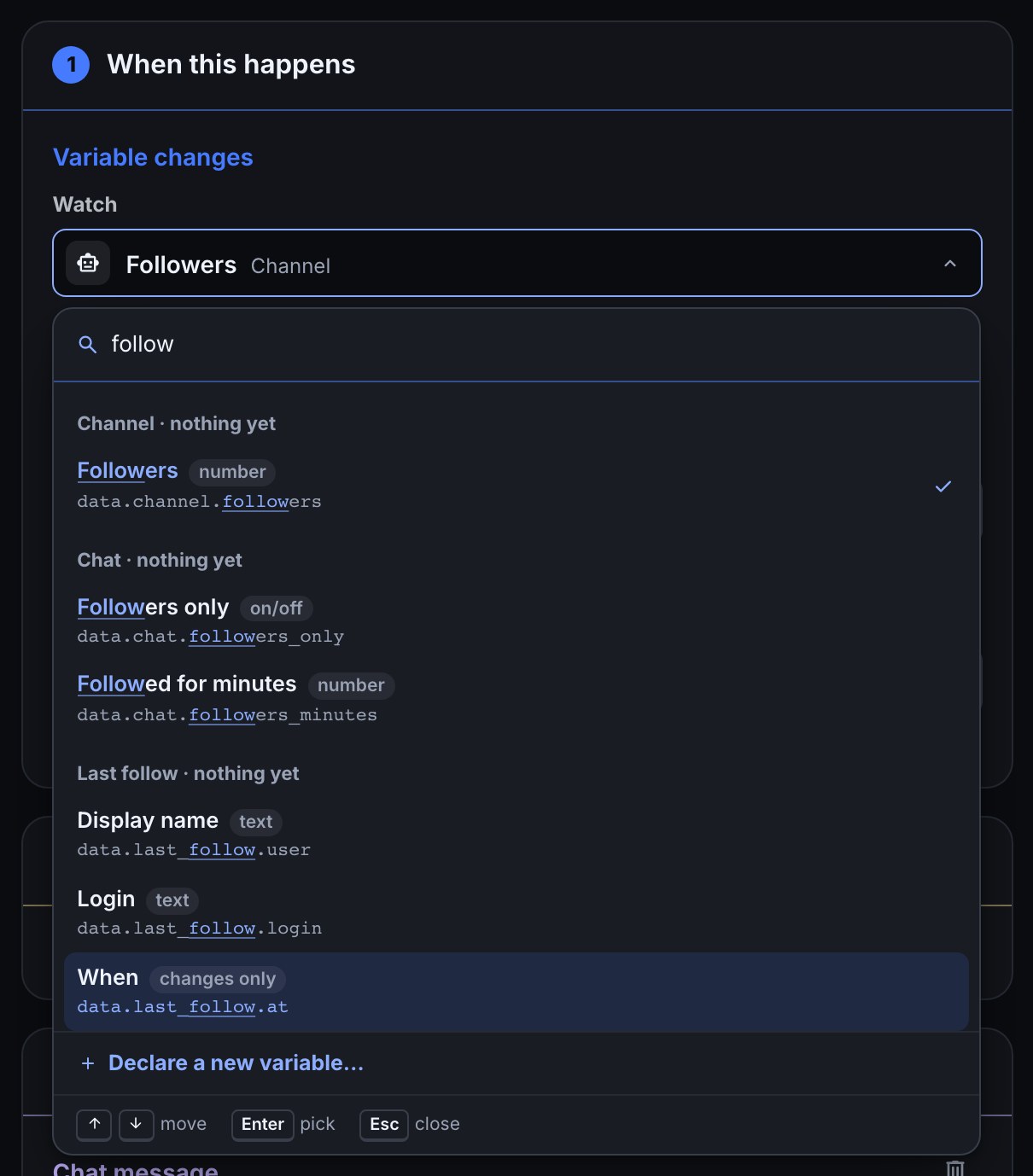
Time online in minutes and the "minutes since" values are not offered here, because they move with the clock rather than with anything that happened; compare them with a Variable is check instead, which offers every value Insert… does.
Channel data → This stream so far keeps count of what has happened since you went live — follows, subs (new and resubs, also listed on their own), subs gifted, unsubs, bits, raids, rewards redeemed, chat messages, distinct chatters, and hype trains — plus who has supported you most:
| Insert… entry | Value | Example |
|---|---|---|
| Top cheerer this stream | $(data.this_stream.top_cheerer) | PixelPal |
| Top cheerer’s bits | $(data.this_stream.top_cheerer_amount) | 200 |
| Top gifter this stream | $(data.this_stream.top_gifter) | Anonymous |
| Top gifter’s subs gifted | $(data.this_stream.top_gifter_amount) | 5 |
Each viewer’s cheers and gifts are added up over the stream, so a viewer who cheers 100 bits twice (200) is ahead of one who cheered 150 once. A gifter who gifted anonymously is shown as Anonymous. A Chat message on a !top command, or on a Stream starts or ends trigger set to when the stream goes offline, could say:
Thank you all! Top cheerer tonight: $(data.this_stream.top_cheerer) with $(data.this_stream.top_cheerer_amount) bits.Channel data → Channel is the size of the channel itself, not this stream: $(data.channel.followers) and $(data.channel.subscribers). A goal bar can track either number. Channel data → Chat → People in chat is who is in chat right now, including people who have not typed. Channel data → Stream → Viewers is the live viewer count, and it is 0 while you are offline.
All four start empty (a blank name and 0) each time you go live. A cheer or gift while you are offline does not count toward any stream. So a message that runs before anyone has cheered this stream shows a blank name; if you would rather say nothing then, put a Channel data is check in front of the message: This stream so far · top cheerer’s bits, At least 1.
One entry on the Insert… menu is a list rather than a single value: Channel data → Song queue → The songs in the queue, which is every song waiting in your queue. A list goes on a For each step rather than into a message — the branch under it runs once per entry, with the current one as $(item) — which is how a flow thanks each viewer, or reads the queue out in order. The song requests guide shows it in place.
Kick in channel data
If you stream on Kick, Bloopbot keeps KICKs apart from bits. Channel data → Last KICKs is the last KICKs gift ($(data.last_kicks.user), $(data.last_kicks.amount)), and This stream so far counts KICKs and keeps the Top KICKs giver this stream ($(data.this_stream.top_kicks_giver)) and their KICKs. A KICKs gift still starts your Cheer flows, but it never counts as bits or as the top cheerer. Channel data → KICKs leaders is your Kick KICKs leaderboard: the top giver of all time, this month and this week, and each top 10.
The last follow, sub, resub, gift, cheer, KICKs and reward each say where they came from, as Platform: twitch or kick. A message such as Thanks $(data.last_follow.user) for the follow on $(data.last_follow.platform)! works on both.
On a Kick channel, Stream is your Kick stream and Channel → Subscribers is your Kick subscriber count, both refreshed about once a minute. Kick doesn't publish a follower count, so Channel → Followers only counts the follows Bloopbot sees. On a Twitch channel with Kick added, Stream and Channel stay Twitch's, and Channel data → Kick stream is your Kick stream: whether it's live, its title, category, viewers and when it went live.
4. The other kind of variable: one that configures a feature
A counter moves as things happen. The other kind does not move on its own: it holds a value a feature reads, and you change it when you want that feature to behave differently. The song limits are five of those, and they are the worked example here — install the Song requests pack, or the Song request template on its own, and it declares all five for you:
| Variable | What it decides | Starts at |
|---|---|---|
song_max_queue | How many songs may be waiting | 20 |
song_per_viewer | How many songs one viewer may hold | 2 |
song_wait_seconds | How long a viewer waits between requests | 60 |
song_block_dupes | Whether the same song can be requested twice | on |
song_requests_on | Whether requests are open at all | on |
- Open Variables and find
song_max_queue, labelled Most songs in the queue. - Change its value from
20to10and save. - In chat, fill the queue with
!srten times, then ask for one more.
Expected result: the eleventh request is turned down in chat with the queue-is-full line, while the first ten went through. Set the variable back to 20 and the same request is accepted — no flow was edited at all, because the shipped steps read $(var.song_max_queue) rather than keeping a copy of the number. The song requests guide shows the Can they request a song? step that reads it, and a flow can write the variable too: the pack’s !sron and !sroff commands set song_requests_on from chat.
5. Show it in OBS
Open Overlays, open an overlay (or make one with New overlay), and add a Label layer from Add. In its Text, write Deaths: $(var.deaths), or put the caret where the number goes and pick deaths from Insert…. Press Publish, then follow the overlay guide to add the overlay’s URL to OBS. Updating the saved value gives chat and your overlay the same count.
An alert title can show a channel variable too: a Follow alert that says Follow number $(var.follows) reads the current follows value when it plays. This also works when the alert text comes from your overlay’s theme. Publish a theme edit before checking the new title in OBS; changing the variable’s value then reaches an already open overlay.
Under the text, the label names every variable it reads and what changes it:
| The line says | What it means |
|---|---|
deaths · Changed by 1 flow · Open | One flow that is switched on changes deaths. Open lists every flow that changes it, each a link to that flow; a paused one is listed and marked paused, but not counted. |
No flow changes deaths yet, so it stays at 0. | Nothing will move the number yet. Its Flows link is where you make a flow with Set a variable, as in step 2. |
deaths isn’t declared yet · Declare | The text reads a variable you have not declared, so nothing fills that spot in yet. Declare opens a small form with the name filled in. |
You do not have to leave the editor to declare one. Insert… → New variable… opens the same small form — a Name, a Type (number, text or on/off) and when it Starts over (never, every stream or every day) — and Create declares it on your channel and puts its $(var.…) at the caret. It follows the same rules as Variables: channel scope, starting at 0, empty text or off, and a name that is 1–32 lowercase letters, digits or underscores. The variable exists as soon as you press Create, before you publish the overlay; if the name is taken, or your channel already has as many variables as its plan allows, the form says so and nothing is declared.
The lines refresh when you come back to the editor, so a flow you turned on or paused in another tab shows the next time the editor has focus.
6. Show a layer only when a value is set
You can make one layer appear when a channel variable has a value, while every other layer in the same overlay stays on screen. For a quest overlay, declare a text variable named quest on Bot › Variables. Leave its starting value empty. Create or open an overlay on Overlays, add a Label layer, and set its text to $(var.quest).
- Select that Label layer in Studio. Open Visibility · Layer below its settings.
- Under Show this layer when, choose Is set, then choose
questunder Variable or channel data. The status line shows the current value and whether this rule hides the layer. - If you want a transition, choose effects under When it appears and When it disappears. With No animation, it shows or hides immediately.
- Press Publish and use the overlay URL in OBS. Set
questtoFind the keyon Variables, or use a flow's Set a variable action. Clear it again when the quest ends.
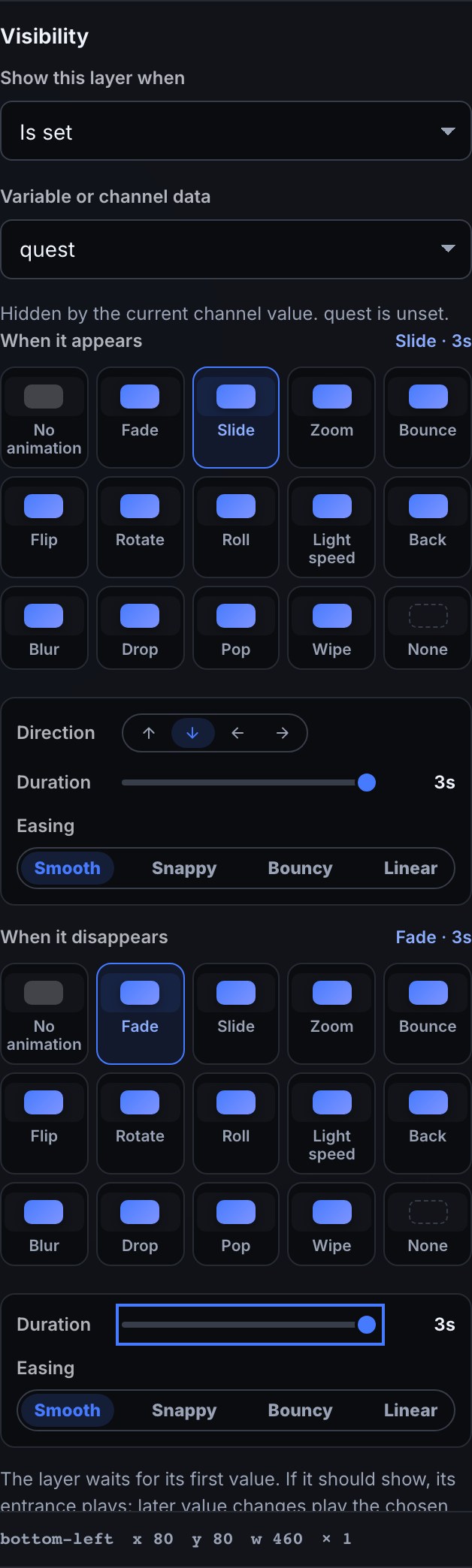
Expected result: the quest Label is absent while quest is empty, appears when it has text, and plays its exit animation before leaving when you clear it. Other layers keep drawing throughout. A fresh OBS page waits for the current value before drawing that Label, so an empty quest does not flash on screen.
Use Equals or Does not equal to compare against one typed text, number or on/off value instead. For example, a number layer can appear when quest_stage Equals 0; zero and off count as set values, while empty text does not. Is not set is useful for a “No quest active” layer. Each layer has one rule.
The visibility picker offers your channel variables and the built-in channel data shown by Insert…. To show a layer only while you are live, choose Stream → Is live and compare it with On. To show it for an Art stream, choose Stream → Category and compare it with Art. Stream → Time online in minutes is a number you can compare with a minute count. Title and category reflect your current Twitch channel settings, including while offline, and refresh about once a minute. The time online value advances while you are live and is unset when you go offline. A viewer variable is specific to one person and cannot control a shared overlay.
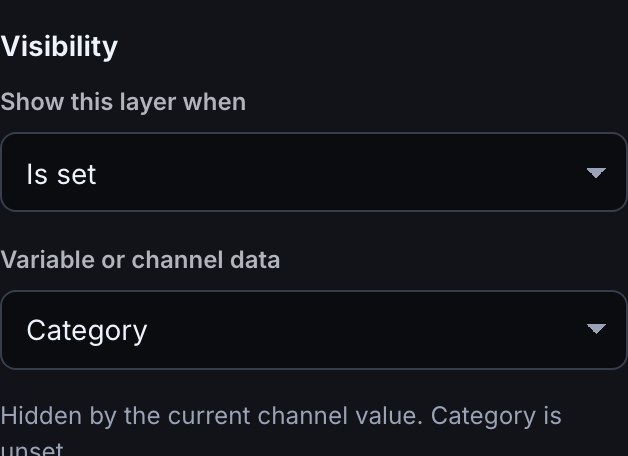
The same channel data is available in a goal bar's Number to track picker when it is numeric. For example, choose Stream → Time online in minutes, set the target to 60, and publish to show progress toward one hour online. A text field such as Category does not appear there. Label and alert text can use the corresponding Insert… tokens, such as $(data.stream.category).
If it stays hidden, check that a chosen variable is declared with channel scope, that the current value satisfies the rule, and that the layer's separate manual Hidden control is off. A manually hidden layer remains hidden even when its source matches, unless a flow’s Show a layer step has shown it (Show or hide layers from a flow). Studio's preview follows the current value unless you enter a Sample value; its status line says when a sample is controlling the preview. Publish to update OBS after changing the rule, while value changes on an already published overlay appear live.
7. Remember each viewer: welcome first-time chatters
A viewer variable keeps one value per person, which is all a first-time greeting needs: a yes/no that says “we have said hello to this viewer”. The Welcome new chatters flow in the Starter pack is built exactly that way, and it declares its variable for you: welcomed, a yes/no, viewer scope, starting at no, never reset.
- Open Flows, press Marketplace, and add the Starter pack, or just Welcome new chatters on its own.
- Open the flow. It reads left to right: Any chat message → Set a variable (
welcomedset to yes for this viewer) → Check a value (the value before the write equalsfalse) → Chat message. - Change the welcome line to sound like you —
$(user)is the viewer’s name — save, and switch the flow on. - Ask a friend who has never chatted in your channel to say hello, then say something again.
Expected result: the bot welcomes them once, after their first line, and stays quiet after their second. On Variables, the welcomed row counts one more viewer with a value.
- New means new since you switched it on. Bloopbot has not remembered anyone yet when you install the flow, so each regular is welcomed once the first time they chat afterwards.
- You and your moderators are chatters too: each of you is welcomed once, the first time you chat after switching the flow on.
- To start over and welcome everyone again, select the reset icon (Reset) on the
welcomedrow on Variables. That forgets every viewer at once. - Test fire is a dry run: it shows which path the flow would take for you, but it never stores
welcomed, so testing does not use up anyone’s welcome.
8. Pick something at random
Pick at random rolls a random whole number in a range, picks one entry from a list you type — weighted if you want — or picks someone who is in chat right now. Like Read a number, it only reads and hands a result forward: nothing is said and nothing changes, so it always sits in front of the steps that use its result.
A magic 8-ball command
- Build a command flow for
!8balland add Pick at random from the node library. - Set Pick to One from a list, and in Options write one answer per line, such as
It is certain,Ask again later,Outlook not so good,Definitely,Very doubtfulandYes, without a doubt. - Add a Chat message step after it, write
@$(user) 🎱, then open its Insert… menu and choose the number written out, the picked option’s text, or who was picked, under From Pick at random, to add the value at the end — don't type a$(from...)token by hand, since the step's own id in it is one the editor makes up. - Save, switch the flow on, and type
!8ballin chat.
Expected result: chat answers with one of the six lines, a different one on different calls. Test fire rolls for real too, so trying it twice in the editor can show two different answers — that is not a bug.
Give some answers better odds by adding a weight after a |: Yes, without a doubt | 3 comes up three times as often as a line with no weight (worth 1 by default). Weights are whole numbers from 1 to 1000, a list holds at most 100 lines, blank lines are ignored, and | is only ever read as the weight separator — leave it out of an answer's own words.
A d20 roll
- Add Pick at random, leave Pick on A number, and set Lowest number to
1and Highest number to20. - Add a Chat message step, write
@$(user) rolled, then use Insert… to add the number rolled, or the picked option's position, under From Pick at random, followed by(d20).
Expected result: a whole number from 1 to 20, both ends included — rolling 1 and 20 come up exactly as often as everything between them. Lowest number and Highest number both take $(...), so a !roll <sides> command can read the top end from what the viewer typed instead of a fixed 20. Each must still be a plain whole number between -1,000,000,000 and 1,000,000,000 once expanded.
A random hug
- Build a command flow for
!hug, add Pick at random, and set Pick to Someone in chat. - Add a Chat message step, write
$(user) hugs, then use Insert… to add the number written out, the picked option’s text, or who was picked, under From Pick at random.
Expected result: the reply names one of the people in your chat right now, never Bloopbot itself. Test fire doesn’t read your chat, so there it names “someone in chat” instead.
If the roll can't happen
The step takes its error output instead of inventing an answer when: Options is empty, Lowest number is above Highest number, either bound isn't a whole number (including one outside ±1,000,000,000), or nobody but Bloopbot is in chat to pick. Wire error to a Chat message if you want to say something back, such as “nobody set up that list yet”.
Was this guide helpful?
Thanks. Your answer helps us decide which guides to improve.
Social accounts in channel data
Variables → Channel data includes Bluesky account, Mastodon account, X account, Threads account, Instagram account, Facebook Page and TikTok account. Each group has its connection status, account name, username or handle and profile link. Connect or remove an account on Connections.
Read the values in a message, a comparison, a widget or a flow's Variable changes trigger. For example,
$(data.social_tiktok.followers)is your TikTok follower count, and$(data.social_bluesky.posts)is your Bluesky post count. You don't need to declare a variable for these values, and flows cannot write them.Counts update about every five minutes. Statistics updated is the time of the reading; Connection checked is the time Bloopbot checked the connection. These are snapshots, not notifications of individual followers. Facebook can report its follower count in the Page like-count field for some Page types.
Check Follower count is available before comparing or showing Followers; its token is
$(data.social_tiktok.followers_available)for TikTok. The other counts have matching availability flags. An unavailable count is unset and expands to blank; a real zero stays 0. Statistics status saysready,unavailable,permission_required,disabled,needs_reconnectornot_connected. If a reading fails or you disconnect, old counts are removed. Reconnect when the account's permissions have expired. Threads statistics may need permission Bloopbot's app doesn't have yet; reconnecting only helps once that permission is available. Connect TikTok explains its connection and the stats card.