
Chat commands for the game you're playing
A flow can ask a game's own data for an answer and post it in chat. Give Old School RuneScape a !ge price check and World of Warcraft a !rio score, and let each command answer only while you're playing its game.
New channels can’t join yet. Already using Bloopbot? Sign in.
Old School RuneScape: !ge
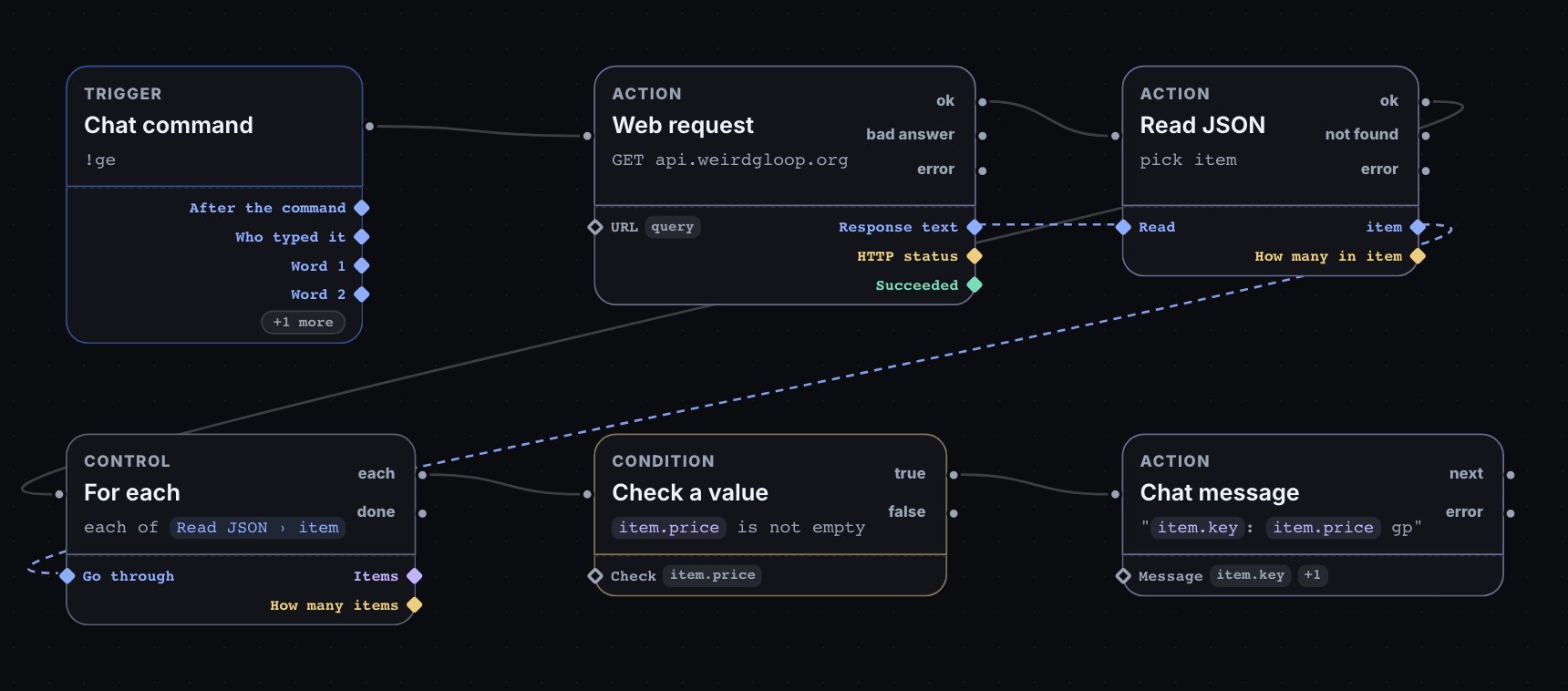
A viewer types !ge twisted bow and the bot answers with the item's Grand Exchange price, from Weird Gloop's price API at api.weirdgloop.org, which needs no key. The flow is six steps:
| Step | Set to |
|---|---|
| Chat command | ge |
| Web request | GET https://api.weirdgloop.org/exchange/history/osrs/latest?name=$(query) |
| Read JSON | Read $(from.web.text), pick item ← * |
| For each | $(from.json.item) |
| Check a value | $(item.price) is not empty |
| Chat message | $(item.key): $(item.price) gp |
$(query) is everything the viewer typed after the command, and the API matches the item's name whatever its capitals, so !ge twisted bow answers Twisted bow: 1356626084 gp. A name the API doesn't know gets no answer, because Check a value stops it. Several names separated by |, such as !ge abyssal whip|dragon claws, get one line each.
World of Warcraft: !rio
!rio posts your character's Mythic+ score from Raider.IO, and only while your stream's category is World of Warcraft:
| Step | Set to |
|---|---|
| Chat command | rio |
| Check a value | $(data.stream.category) equals World of Warcraft |
| Web request | GET https://raider.io/api/v1/characters/profile?region=eu&realm=your-realm&name=YourCharacter&fields=mythic_plus_scores_by_season:current |
| Read JSON | Read $(from.web.text), pick score ← mythic_plus_scores_by_season.0.scores.all |
| Chat message | YourCharacter: $(from.json.score) Mythic+ score on Raider.IO |
Put your own region, realm and character name in the address. The score comes out with one decimal, as Raider.IO gives it.
Only while you play it
$(data.stream.category) is the category your stream is set to on Twitch, kept up to date as you change it. A Check a value step on it keeps a command quiet in any other game, so !rio says nothing while you're in RuneScape. Add the same step to !ge, set to Old School RuneScape, and each game's commands only answer in their own game.
What you need
- The Pro plan. The Web request step is part of Pro; the rest of these steps come with every plan. What your plan includes lists the plans.
- Web requests allowed. On the Flows page, choose Web requests: off so it reads Web requests: allowed. It is one switch for your whole channel.
- A public https address that answers quickly. A request must answer within 2 seconds, only the first 64 KB of an answer is read, and one run can make two requests.
Test fire doesn't reach the game's website: the Run log shows the address it would call. Type the command in your own chat to see the real answer.
Give your game its own commands.
Sign in with Twitch, allow web requests on the Flows page and build !ge or !rio from the steps below.
New channels can’t join yet. Already using Bloopbot? Sign in.