
What Free+ gives you
Free+ is the Free plan plus web requests in your flows, for streamers in the Bloopbot Discord. It costs nothing. A Web request step can fetch a forecast, ping your own server or post to a service, the way it does on Plus. Use Stream Deck keys and web requests in flows shows how to build one.
Everything else is the same as Free, including the small Stream on Twitch? box at the bottom of your public page. Free+ has limits that Plus and Pro don't: see How many web requests Free+ runs.
Only Free channels switch to Free+. A channel on Plus, Pro or Legacy keeps its plan, and one Discord account unlocks one channel.
Join from the dashboard
You need to be the channel's owner, on the Free plan, with a Discord account.
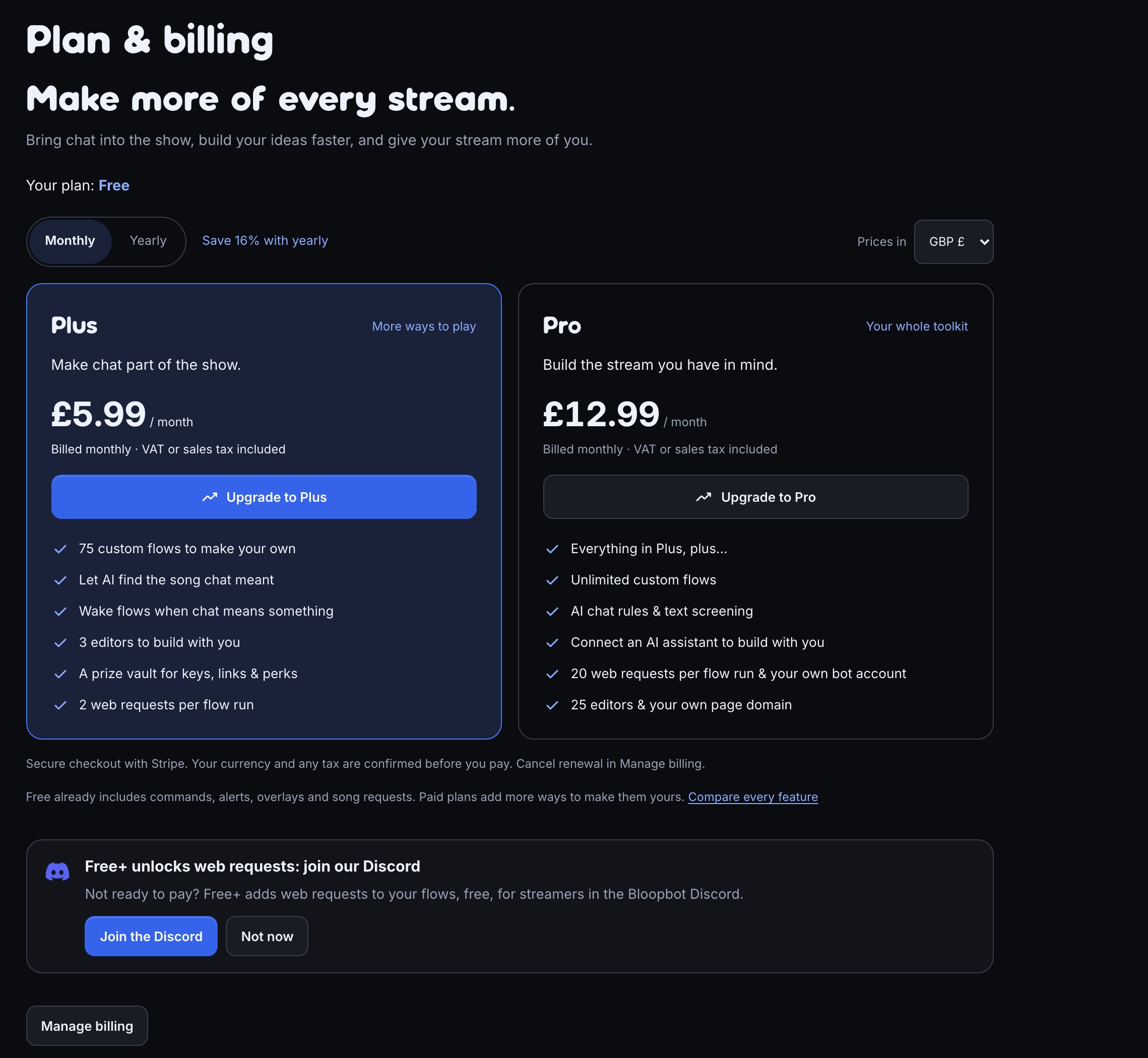
- Find a Join the Discord button. On Free it appears on Overview under Unlock Free+ with Discord, on Plan & billing under Free+ unlocks web requests: join our Discord, on a locked Web request step as Free+ unlocks this: join our Discord, on the Discord card under Connections as Join ours too? Unlock Free+., and and on the last card of Your first overlay as the link Join the Bloopbot Discord.
- Choose Join the Discord. Discord asks you to sign in and to let Bloopbot add you to its server. Allow it.
- You land on Overview, which says You’re in the Bloopbot Discord. This channel is on Free+: web requests are unlocked. Plan & billing now reads Your plan: Free+.
- On the Flows page, the header button reads Web requests: off until you allow them. Choose it so it reads Web requests: allowed. This is one switch for your whole channel, whatever its plan.

Already in the Bloopbot Discord? Choose Already a member? Link your Discord under the offer on Overview, or any Join the Discord, and sign in with the same account. You won't join twice: it links your account to your channel, and the channel switches to Free+. After Link your Discord, Overview says Your Discord account is linked.
Not now on a prompt hides that one for 30 days. They all go away while your linked Discord account is in the Bloopbot Discord, and come back if it leaves and Free+ ends.
How many web requests Free+ runs
| Limit | Free+ |
|---|---|
| Web requests in one flow run | 2 |
| Flow runs with web requests, per day | 50 |
| Flow runs with web requests, per month | 200 |
Days and months follow UTC: the day's count starts again at midnight UTC, and the month's on the 1st.
- A run counts once, however many web requests it sends.
- A run paused by a Wait counts again when it carries on, because the part after the Wait runs as a new run.
- Test fire never sends a request, so it never counts.
- Web requests from a marketplace pack that works on every plan never count, as long as you leave them as they came.
When a run would go over either limit, it isn't skipped. Its Web request step sends nothing and leaves by bad answer with status 0, and the rest of the run carries on down that path. The Run log gives the reason, for example: “This channel has used its 50 flow runs with web requests for today. Upgrade for unlimited:”, followed by a link to Plan & billing.
For example, give a !weather command's Web request a bad answer path to a Chat message saying “The forecast is resting, try again tomorrow.” On a day the limit is reached, chat gets that line instead of silence.
If you leave the Discord
Leaving the Bloopbot Discord doesn't end Free+ straight away. Your channel stays on Free+ for 7 days, and Overview says You left the Bloopbot Discord, so Free+ ends on the date, with Rejoin the Discord.

- Choose Rejoin the Discord on Overview and sign in with the same Discord account.
- Overview says you're in the Bloopbot Discord again, and the end date is gone.
If you don't rejoin, your channel goes back to Free on that date. Your flows stay exactly as they are, but their Web request steps stop running, as on Free, and the Run log says your plan doesn't include them. Rejoin at any time to turn Free+ back on.
Free+ and paid plans
- The button at the foot of the dashboard's menu reads Free+ plan · Upgrade. On Plan & billing, the Plus card lists No daily or monthly cap on web requests, which is what Plus adds to Free+.
- Upgrading replaces Free+ with Plus or Pro. Staying in the Discord changes nothing while you pay.
- When a paid plan ends and your linked Discord account is in the Bloopbot Discord, your channel lands on Free+ instead of Free.
- What your plan includes covers prices and checkout.
Troubleshooting
- Overview says “This Discord account already unlocks” and names another channel: one Discord account unlocks one channel. Sign in with the Discord account that belongs to this channel, or email [email protected] to move the link.
- “That Discord account isn’t in the Bloopbot Discord yet.”: the account you signed in with isn't in the server. Choose Join the Discord on the same card.
- “Couldn’t reach Discord, try again.”: nothing changed. Choose Try again.
- You joined the Discord from a link outside the dashboard and your channel is still on Free: Bloopbot doesn't know which channel is yours yet. Choose Join the Discord on Plan & billing to link your account.
- There is no Join the Discord anywhere: only the channel's owner sees them, and only on Free. A prompt also stays hidden for 30 days after Not now, and while your linked account is in the Bloopbot Discord.
- A Web request leaves by bad answer with status
0and the Run log says the channel has used its flow runs with web requests: that's the day's or the month's limit. It starts again at midnight UTC or on the 1st, or upgrade to Plus for no limit. Use Stream Deck keys and web requests in flows covers other reasons a request fails.
Was this guide helpful?
Thanks. Your answer helps us decide which guides to improve.