
Export a flow
Open the flow and select the download icon (Export) in the top bar to download its JSON. Review messages, links and configured values before sharing it. Exported flows describe the graph; they do not make another channel’s variables, Twitch rewards or permissions appear automatically.
Notes on nodes come along, so whoever installs the flow can read them.
An export names each channel point reward by its title, never by your reward’s Twitch ID. If a reward’s title can’t be read when you export, the file says A channel point reward instead, and whoever imports it picks their own reward.
A flow with a Play media step, a Stream Deck button key graphic, or a Show alert step that shows one of your alert designs, downloads as a bundle file instead, named like cosy-follow.bloop.zip. It holds the flow, the alert designs it shows and the images, sounds or videos they use, so the flow still works in the channel that imports it. A picture or a sound in it can be up to 5 MB and a WebM video up to 25 MB, and the whole file holds up to 95 MB; if the files add up to more, export fewer flows or widgets together. Share the whole .bloop.zip; the JSON inside it can’t bring the files on its own. A Show alert step whose design is a variable, such as $(var.which), carries no design: the channel that imports it uses its own.
Download a picture of a flow
To show a flow in a blog post, a Discord message or a tutorial, save a picture of it. Open the flow and select the picture icon (Download image) in the top bar, then choose PNG image or WebP image. The picture shows every step and connection exactly as the canvas draws them, sized to fit the whole flow, whatever you have zoomed to or selected. It is named after the flow, such as clip-it.png.
The picture shows the flow as it is on the canvas when you choose, including changes you have not saved yet. It does not hold the flow itself: to let someone install it, export it or share a link. WebP files are smaller; if your browser cannot make one, Bloopbot says so and you can choose PNG instead.
Export several flows as one bundle
A bundle file carries several flows together, with everything they need, so someone can set up the same thing in one import.
- On the Flows page, tick the flows you want to share. Hold Shift while ticking to take every flow in between; see Select several flows at once.
- Choose Export bundle in the bar that appears at the bottom of the list.
- Give the bundle a Name, and optionally say What it does.
- Read Comes along: every group, alert design, file, variable and reward the flows need, and which flow needs each one. These always come with the flows, because the flows break without them.
- Under Add widgets, tick any widget you want to share too. A widget brings the alert designs its layers show, and the images, videos and sounds it uses: backgrounds, frames round its panels, chat lines and alert cards, and the files its image, slideshow, boss and sound layers play.
- Press Download .bloop.zip, and share that file as it is.
A pack of only overlays exports them on their own: open the pack under Packs → Mine and choose Bundle file (.bloop.zip).
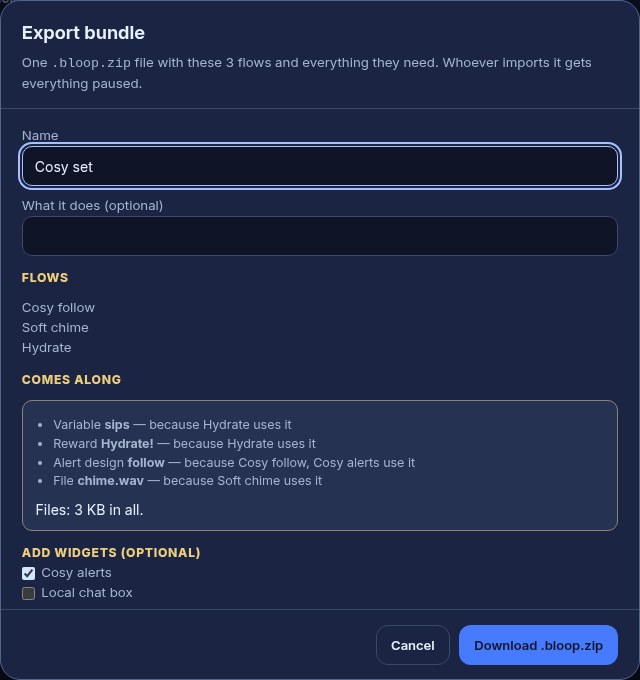
For example, exporting a Cosy follow flow that shows your follow alert design, together with your Cosy alerts widget, gives one file that sets up the flow, the design and the widget on another channel.
Those files come along in the .bloop.zip, listed under Comes along once you tick the widget, and land in the media library of whoever imports it, in a folder named after the bundle under Imported. Your widgets' links stay yours: whoever imports the bundle gets new links for them. Channel point rewards travel by name and cost only: whoever imports the bundle picks one of their own, or has Bloopbot create it, switched off.
You can do the same from Marketplace → Made by you: press Share…, then Export bundle…, and pick the flows.
Import someone else’s flow
You can bring in a flow someone exported, or a pack or bundle holding several flows. It opens as a Marketplace item, with its review, and nothing is added until you press its button.
- On the Flows page, open + New flow and choose Paste a link or drop a file. The Marketplace opens with the box ready. (On the Marketplace itself, press Paste a link at the top.)
- Paste a Bloopbot link, or drop the
.jsonor.bloop.zipfile onto the box. - Check the review. It says what adding does, and What you get lists its flows, overlays and alert designs. What’s inside, folded underneath, names each one, and the files it carries and how much they add to your file storage. A design, widget or file you already have is reused, never changed or copied twice. Files that are new to you land in your media library, in a folder named after the item under Marketplace, or after a dropped file's bundle under Imported.
- If it uses a channel point reward, the review asks which of your rewards it is, or offers Make it for me, which creates the reward on your channel at the cost it gives, hidden from viewers until you turn it on in your Twitch reward settings.
- Press Add … — paused, for example Add 3 flows — paused. Everything arrives paused.
- Open each new flow, check each node and run a dry test before turning it on.
For example, a “Hydration” pack whose Sip flow uses a reward called Hydrate! can use your own Drink water reward instead: pick Drink water in the review’s reward question, and the flow runs when Drink water is redeemed.
If the review says there isn’t room for its alert designs or widgets, remove some you no longer use under Overlays, then try again. If it says a bundle uses files that only travel in its .bloop.zip file, ask for the .bloop.zip rather than the text inside it. More on the box is in Paste a link or drop a file.
Share with every streamer
A file or a link reaches the people you give it to. To offer your flows or a theme to every streamer, list it in the marketplace: in Marketplace → Made by you, press Share…, then Submit for review…. It is reviewed, then anyone can add it, paused. See List your flows and themes in the marketplace, and Add from the Community group for the other side.
Recover an earlier version
Open History (the clock icon in the top bar) in the flow editor, inspect a previous version and use the restore control when you want to bring it back. Verify the restored graph and its live state. Deleted flows can be restored from Flows → Trash during the 30-day retention period.
Was this guide helpful?
Thanks. Your answer helps us decide which guides to improve.