
Your first Twitch bot, picked for you
Most beginners need three things from a bot on day one: a few commands, some spam protection and something on screen when someone follows. Here are five bots that do that, ranked by how quickly a first-time streamer gets there and how far each one grows afterwards.
We make Bloopbot, so read our pick with that in mind. Every other bot's details come from its own pages, checked September 2026.
The short answer
| Install anything? | Time to first command | Overlays and alerts | Grows into | Platforms | |
|---|---|---|---|---|---|
| 1. Bloopbot | No | A few minutes, guided by Pebble | Hosted, added to OBS as a Browser Source | Flows you can open and change, step by step | Twitch |
| 2. Nightbot | No | A few minutes | None | Commands with $(variables) | Twitch, YouTube, Trovo and SOOP |
| 3. Moobot | No | A few minutes | None; follows and subs as chat notices | Panels for commands, timers and giveaways | Twitch |
| 4. StreamElements | No | Longer: a full toolkit to set up | Overlays and alerts | Loyalty, a store and overlays in one place | Twitch, YouTube and Kick |
| 5. Streamer.bot | Yes, a Windows app | Longest: actions, sub-actions and triggers | Build your own | Almost anything, including C# | Twitch, YouTube, Kick and Trovo |
How we ranked them
We asked what a first-time streamer actually runs into: Do I have to install something? Does it keep working when my PC is off? Can I see why a command did what it did? Will I outgrow it in a month? A bot scored higher when the answer was no, yes, yes and no.
We left out size of community and years in business. Those matter, and the older bots win them, so we say so in each entry.
1. Bloopbot: best for a beginner who wants to grow
Bloopbot is a Twitch chat bot where every command, alert and timer is a visual flow you draw in your browser. For a beginner, that means you never stare at a blank settings page.
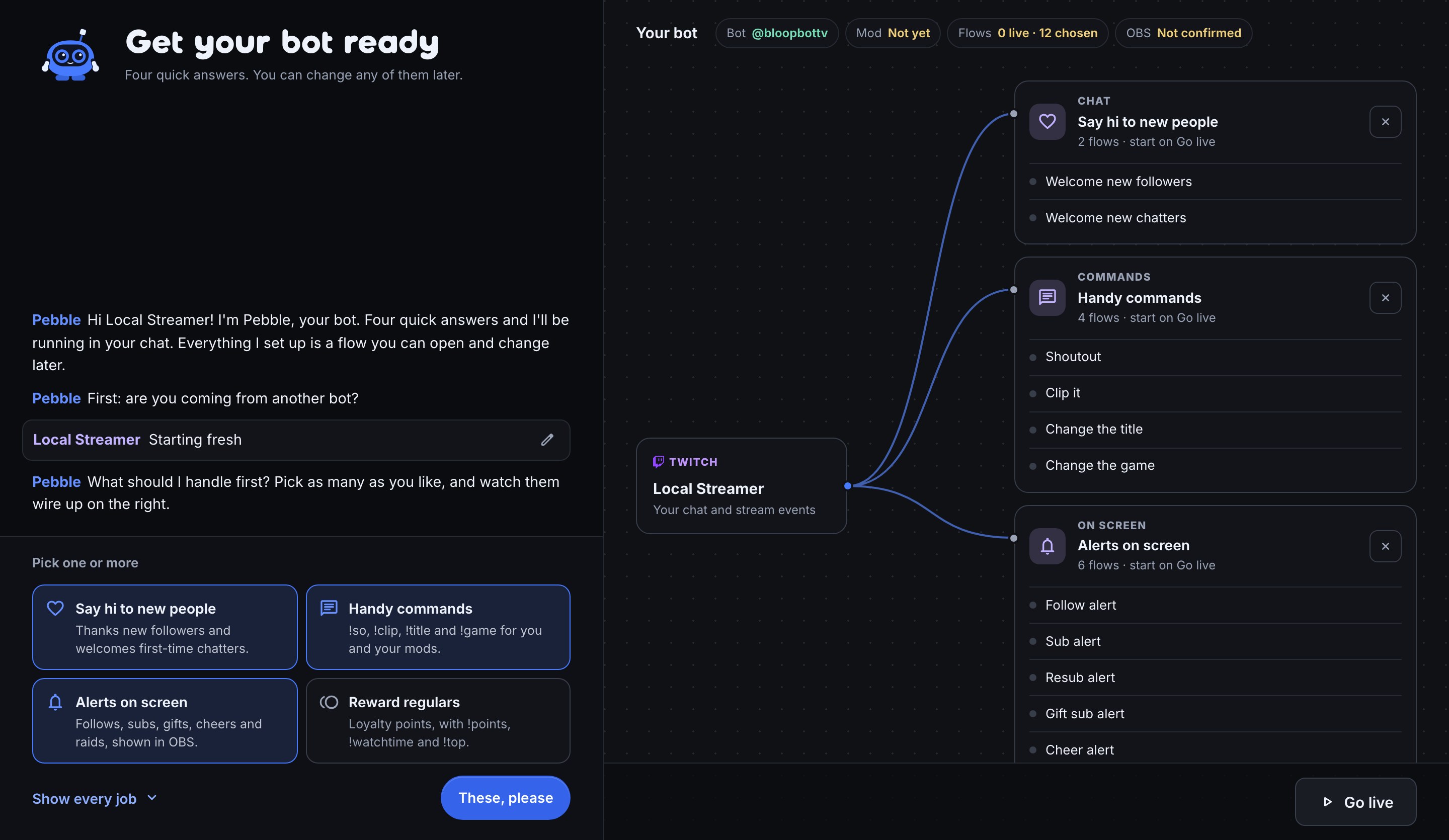
- Setup is a conversation. Pebble, Bloopbot's robot, asks what you want your bot to handle, such as welcoming new people, handy commands, alerts on screen or rewarding regulars, and wires the flows onto a canvas while you watch.
- It checks your mod step for you. Pebble asks Twitch whether the bot is a moderator, so you know it can actually act in your chat.
- Coming from another bot? Pebble looks your channel up in Nightbot and StreamElements and offers to bring your commands over, counts included.
- You can see why things happen. Each command is a row of steps, such as Chat command → Cooldown → Chat message. Test fire runs it before you go live, and the Run log shows the path it took.
- It runs in the cloud. Commands, timers and moderation keep working when your PC is off, on a Mac, a PC or a laptop.
- Overlays come with it. Add a hosted alerts overlay to OBS as a Browser Source, and follows, subs, cheers and raids each play an alert from a flow you can open.
Where it falls short: Twitch only. It can't switch OBS scenes or drive apps on your PC. It's newer than everything else on this list. Some features, such as AI steps, may not be included on your plan; what your plan includes lists them.
2. Nightbot: best for "just a few commands"
Nightbot is simple, free, long trusted and fast to set up. You add a command, type its reply, and you're done. Custom logic uses $(variables) such as $(urlfetch), and it has timers, a blacklist and spam filters, and YouTube and SoundCloud song requests.
Pick it if one line per command is all you'll ever need, or you also stream on YouTube, Trovo or SOOP. Skip it if you want alerts on screen or loyalty points: Nightbot has neither. If you outgrow it later, Bloopbot imports your Nightbot commands.
3. Moobot: best for rewarding subscribers
Moobot is very easy to set up and long trusted. Commands, timers and spam filters are configured in panels, and it's good at subscriber perks, with subscriber-only or weighted giveaway entries. Follows and subs are announced as chat notices.
Pick it if its panels already cover what you need, or you want its Discord integration and game stats. Skip it if you want those follows and subs as alerts on your overlay. Moobot vs Bloopbot shows the same perk built as a flow.
4. StreamElements: best all-in-one toolkit
StreamElements is a free toolkit with overlays, alerts, a chatbot and loyalty points in one place, on Twitch, YouTube and Kick. That breadth is the draw, and also the reason it takes longer to set up as a beginner.
Pick it if you stream to YouTube or Kick as well as Twitch. Worth knowing: Razer acquired StreamElements' assets in July 2026, and SEPay tipping is closing. Switching from StreamElements explains what moves across.
5. Streamer.bot: most powerful, least beginner-friendly
Streamer.bot is a free Windows app that can do almost anything: switch OBS scenes, drive VTube Studio and Voicemod, and run your own C# code. It runs on your PC, so your PC has to stay on, and on a Mac or Linux it only runs through compatibility layers it calls experimental.
Pick it if you're comfortable with technical setup and want the bot to control apps on your PC. Skip it if you're on a Mac or this is your first stream. Streamer.bot vs Bloopbot compares them in detail.
Which one should you pick?
- Brand new and on Twitch: Bloopbot. Pebble gets you to working commands and alerts in one sitting, and spam filters are one page away, and every piece stays open for you to change later.
- Only ever want three text commands: Nightbot.
- Streaming to YouTube or Kick too: StreamElements, or Nightbot for chat only.
- Want the bot to run your PC: Streamer.bot, once you're comfortable.
You can run Bloopbot beside any of them while you decide, as long as the two never answer the same command.
Set up your first bot in about ten minutes.
Sign in with Twitch and Pebble walks you through it.