
What you can do
When you run a poll or prediction on Twitch, or chat starts a hype train, Bloopbot can react in chat and on your overlay: announce the poll winner, say who won the prediction and how many points were in play, cheer each hype train level. A flow can also start a poll or prediction for you — from a chat command, a channel points reward or a Stream Deck key — and lock or settle it later.
Before you start
- Polls and predictions are Twitch features for Affiliate and Partner channels; hype trains happen when chat gets one going. Bloopbot reacts to them and can start polls and predictions, but only where Twitch offers them on your channel.
- These steps are listed under Twitch in Flows → Your plan, as Polls & predictions and Hype trains. They are not available on every channel yet; a step your channel does not include shows a lock in the node library. What your plan includes explains the panel.
- Bloopbot needs your permission for polls, predictions and hype trains on Twitch. A channel connected before these were added shows Update available on Links; choose Re-authorize there. Until then, a flow that needs one is listed in Flows → Needs attention as blocked.
1. Install the ready-made reactions
The Stream events pack has a flow for each moment. Open Flows → Explore packs, choose Stream events and install the ones you want — they arrive paused.
| Flow | Posts in chat |
|---|---|
| Poll results | The winner when a poll ends, whether it ran its full time or you ended it early |
| Poll: progress nudge | A reminder to vote with the current tally, at most every 30 seconds |
| Prediction: opened | That predictions are open, with the question |
| Prediction: resolved | The winning outcome, how many took part and the points wagered |
| Prediction: cancelled | That it was called off and points are refunded |
| Hype train cheer | A rallying line when a hype train starts |
| Hype train: level up | The new level and progress, at most every 20 seconds |
Open each one, reword its message if you like, Save, and switch it on.
2. Choose the moment
Each flow starts from one trigger, and a field on it picks the moment:
- Twitch poll changes — When it: Starts, Gets a vote, Ends or Any of these. With Ends, Outcome narrows it: Finished (completed or ended early), Completed normally, Ended early or Archived.
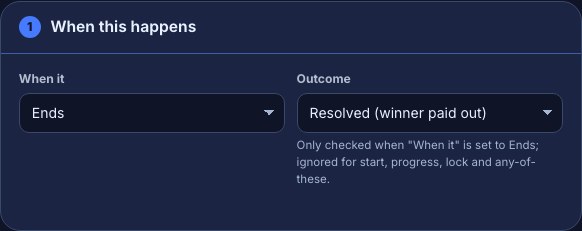
- Twitch prediction changes — When it: Starts, Gets a bet, Locks, Ends or Any of these. With Ends, Outcome tells Resolved (winner paid out) from Cancelled (points refunded).
- Hype train — When it: Starts, Gets a contribution, Ends or Any of these, plus At least level to wait for a bigger train. Zero means any level.
Gets a vote, Gets a bet and Gets a contribution fire on every single one, so put a cooldown after them, as the nudge and level-up flows do — Add permissions and cooldowns shows how.
3. Use the details in your message
The Insert… menu on a chat message offers what each trigger carries. In a poll, $(winner) is whoever is leading so far, so it is only final when the poll Ends. In a prediction, $(winner) stays empty until it resolves.
| Trigger | Tokens |
|---|---|
| Poll | $(title), $(choices) with their votes, $(winner) (the leader so far), $(winnervotes), $(totalvotes) |
| Prediction | $(title), $(outcomes) with their backers, $(totalusers), $(totalpoints), and once it resolves $(winner) |
| Hype train | $(level), $(total), $(progress) and $(goal) for this level, $(topuser), $(lastuser) |
For example, Prediction: resolved says:
"$(title)" is settled — $(winner) wins! $(totalusers) players, $(totalpoints) points total.4. Start a poll or prediction from a flow
Add Run a Twitch poll or Run a Twitch prediction as an action — for example after a !vote command that only moderators can use.
Run a Twitch poll: set Do to Start a poll, then Question, Choices (one per line, two to five) and Seconds, from 15 to 1800 (60 to start with). Questions are cut to 60 characters and choices to 25.
Run a Twitch prediction: set Do to Start a prediction, then Title, Outcomes (one per line, two to ten) and Open for (seconds), from 30 to 1800 (120 to start with). Titles are cut to 45 characters and outcomes to 25.
The other choices in Do act on the poll or prediction the flow was started by — a flow whose trigger is Twitch poll changes or Twitch prediction changes — or on the one the same run started a step earlier:
- Polls: End the poll stops it and shows the result; Archive the poll removes it without results.
- Predictions: Lock the prediction stops new bets; Resolve it (pick the winner) pays out, with Winning outcome set to the outcome’s number (1 is the first line), its exact name, or a token; Cancel it (refund) gives everyone their points back.
A run can start or change up to five polls, predictions or markers.
Show them on your overlay
The Event stack widget shows real Twitch polls, predictions and hype trains as they happen, with no flow needed — Add a widget to OBS shows how. To put one on screen without anything running on Twitch, the Overlay topic has Overlay poll card, Overlay prediction card and Show a hype train, which draw on the widget from numbers your flow gives it and step aside while a real one is running.
Check it works
- Press Test fire in the flow. It plays a realistic made-up event: the poll What should we play next? (Elden Ring 12, Hollow Knight 7), the prediction Do we win this one? (Yes and No), or a hype train that Lasthyper started.
- A trigger with more than one moment has a picker next to Test fire — choose Default moment, or the start, a vote, a lock or the end, to test each path. For Poll results, the Run log shows the bot would post Poll over! "What should we play next?" — Elden Ring wins with 12 of 19 votes.
- A test never reaches Twitch. Run a Twitch poll and Run a Twitch prediction show what they would start or end, and no poll, prediction or points change on your channel.
- For a live check, run a short poll on Twitch during a stream and watch the result land in chat.
Troubleshooting
- Nothing happens when a poll ends: the flow is paused, or it is listed as blocked in Flows → Needs attention — choose Re-authorize on Links to grant the permission.
- Both resolved and cancelled lines post for one prediction: a flow’s Outcome is set to Any. Set Resolved (winner paid out) on one and Cancelled (points refunded) on the other.
- The winner is wrong or empty: in a poll, a flow that runs before Ends gets whoever is leading at that moment; in a prediction,
$(winner)is empty until it resolves. Set When it to Ends (and, for a prediction, Outcome to Resolved (winner paid out)). - Chat is flooded during a hype train: the flow fires on every contribution. Add a cooldown, or use At least level.
- Starting a poll or prediction fails: Twitch refused it — your channel may not have polls or predictions, or one is already running. The Run log carries Twitch’s answer.
- A step shows a lock: your channel does not include that capability yet. Your other flows carry on as before.
Was this guide helpful?
Thanks. Your answer helps us decide which guides to improve.