
What you get
Your channel has a numbered quote book. Viewers type !quote for a random one or !quote 12 for a particular one, and your moderators add, fix and remove quotes from chat. You can also look after the whole book from your dashboard.
Every quote keeps its number for good. Deleting quote #3 leaves a gap; the next one added is still the next new number, so !quote 12 always means the same line.
Before you start
- The Quotes flow, from the Starter pack. If you installed Starter during setup you already have it, paused. Otherwise open Flows → Explore packs and install Quotes on its own or with the pack — Use templates and flow packs shows how.
- The bot as a moderator in your chat, as for any command — the Setup guide’s Give the bot mod step.
1. Add quotes from the dashboard
- Open Quotes in the sidebar, under Content.
- Choose + Add Quote, type the line in Quote Text and choose Save Quote.
- The quote joins the list with its number, who added it and when. Use Search quotes... to find one, the pencil to edit its text, and the bin to delete it.
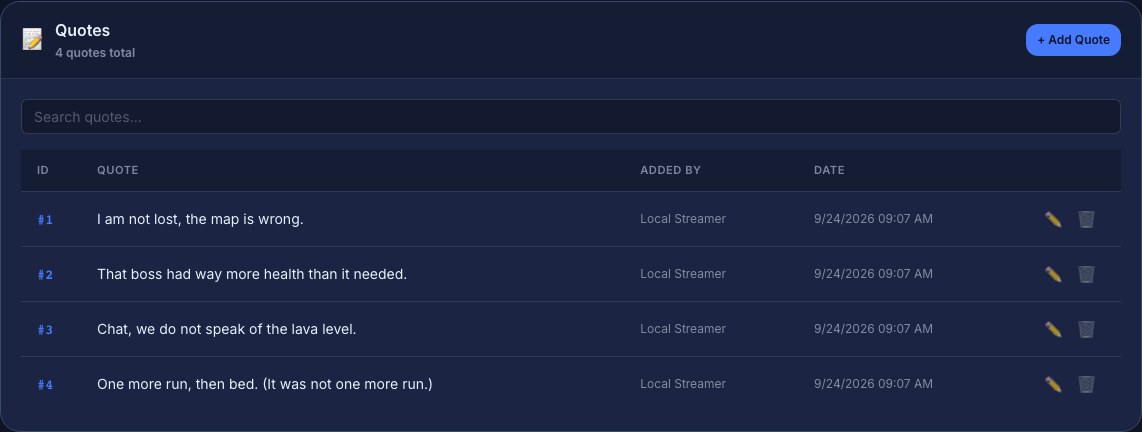
Editing keeps the quote’s number. Deleting asks you to confirm and cannot be undone.
2. Turn on the !quote command
- Open Flows and find Quotes. It has one trigger, the chat command
!quote, and one Quotes step set to Handle the !quote command. - Check Who can read on that step. Everyone lets any viewer pull up quotes; pick a higher level to keep reading to subscribers, VIPs or moderators.
- Press Save, then switch the flow on.
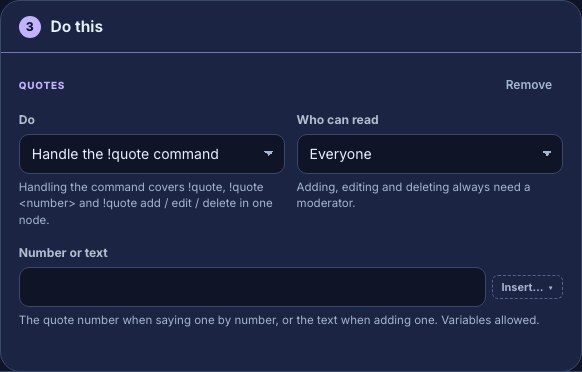
That one step answers every form of the command:
| In chat | What happens | Who can |
|---|---|---|
!quote | Posts a random quote, such as #2: That boss had way more health than it needed. | Whoever Who can read allows |
!quote 2 | Posts quote #2 | Whoever Who can read allows |
!quote add I am not lost, the map is wrong. | Saves it and replies Added quote #5. | Moderators and you |
!quote edit 5 I am not lost. The map is wrong. | Replaces the text and replies Updated quote #5. | Moderators and you |
!quote delete 5 | Removes it and replies Deleted quote #5. !quote remove 5 works too. | Moderators and you |
Adding, editing and deleting always need a moderator, whatever Who can read says. A quote added from chat is credited to the person who typed it.
Other ways to use quotes
The Quotes step has three more choices in Do, for flows that are not the !quote command:
- Say a random quote — for example, on a timer that posts one every so often. Post a recurring chat message shows the timer.
- Say one quote by number — set Number or text to the number, or to a token.
- Add a quote — set Number or text to what should be saved, such as
$(query)from a channel points reward that asks for text, so viewers can suggest quotes. Respond when a viewer redeems a reward covers rewards.
To have an AI read new quotes before they are saved, install Check a quote before saving it — Screen text before it is shown or saved walks through it.
Check it works
- In the Quotes flow, press Test fire. The dry run plays a made-up
!quote sample arg, so the Run log shows the bot would reply Error: Quote not found. — expected, becausesampleis not a quote number. It proves the flow is wired; it posts nothing, and a test never adds, edits or deletes a real quote. - With the flow on, type
!quotein your Twitch chat. The bot posts a real quote from your book. - As a moderator, try
!quote addwith a test line, then!quote deletewith the number it gives back.
Troubleshooting
- Nothing happens on
!quote: the flow is paused, the viewer is below Who can read, or another flow also answers!quote. Check Flows → Needs attention. - Error: No quotes found.: the book is empty. Add one from the Quotes page or with
!quote add. - Error: Quote not found.: there is no quote with that number, often because it was deleted. Numbers are never reused.
- A line starting Usage: !quote: the command was missing its number or text.
- A viewer’s
!quote addis ignored: only moderators and you can add, edit or delete.
Was this guide helpful?
Thanks. Your answer helps us decide which guides to improve.